Physical Address
304 North Cardinal St.
Dorchester Center, MA 02124
Physical Address
304 North Cardinal St.
Dorchester Center, MA 02124

A practical passkey wallet guide to recovery risk and safer setup checks.
A passkey wallet is a crypto wallet that uses a device passkey to create, access, sign with, or recover crypto without handling a seed phrase.
That can make a wallet feel much closer to a normal app. You may approve actions with Face ID, a fingerprint, a device PIN, a password manager, or a hardware security key. But the easier login does not answer every custody question.
A passkey wallet can still leave you stuck, reject a dapp, fail on an unsupported chain, or depend on a recovery key you never saved. Before funding one, check whether its recovery path, signing model, and supported chains match the assets you plan to hold.
A passkey wallet is a crypto wallet where a passkey helps prove access to the wallet, approve actions, or restore access through a supported recovery design. The passkey is usually tied to your device, operating system, password manager, or hardware security key.
That is different from a traditional wallet where the user writes down 12 or 24 recovery words at setup. A passkey wallet may hide that seed-phrase step, replace it with a smart account, or combine passkeys with another recovery method.
The label alone does not prove who controls recovery. Some designs are self-custody. Some are embedded inside an app. Some use smart contracts. Some are closer to account login with crypto features attached. Same friendly button, very different custody map.
These terms are worth separating before money enters the wallet.
| Term | Plain Meaning |
|---|---|
| Passkey | A phishing-resistant login credential stored on a device, platform account, password manager, or security key |
| Private Key | The secret cryptographic material that can authorize wallet activity |
| Seed Phrase | A human-readable backup used to recover many traditional wallets |
| Recovery Key | A wallet-specific backup or restore code, not always the same as a seed phrase |
| Smart Wallet | A wallet account controlled by smart-contract rules instead of a plain private-key account |
A passkey wallet can reduce one common failure point, but it creates a new checklist. Know where the passkey lives, how recovery works, and whether the wallet behaves like the wallet you expect.
A passkey wallet works by using a passkey to prove that the right user, device, or credential manager is approving an action. The wallet then turns that approval into a wallet action, such as creating an account, signing a message, or sending a transaction.
In many setups, the passkey is built on public-key cryptography. The private side stays with the device, password manager, or security key. The public side can be checked by the app, wallet service, or smart account.
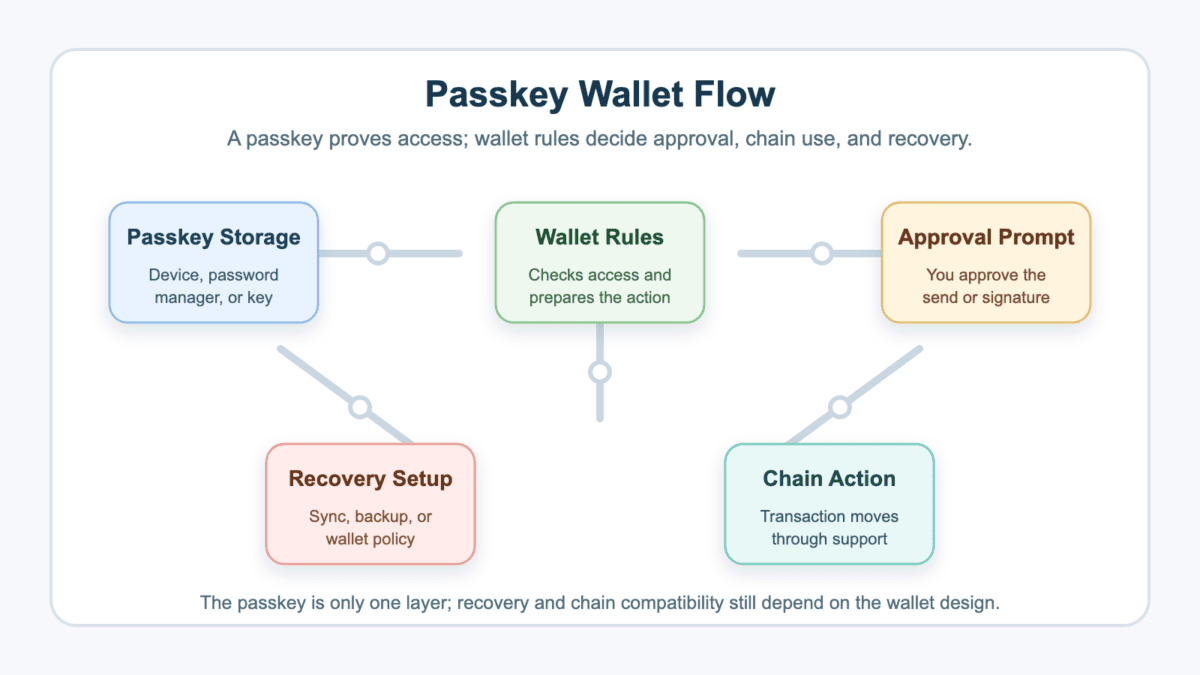
The flow usually looks like this:
At the web-standard level, passkeys use public-key cryptography and resist phishing because browsers and operating systems bind them to the correct site or app.
Crypto adds another layer. A normal login only gets you into an app. A wallet action can move funds, sign a dapp message, claim a token, or change recovery settings. That is why the wallet’s chain support and recovery design matter as much as the passkey itself.
A passkey wallet changes how you prove access and how you recover, while a seed phrase wallet usually gives you recovery words that can recreate the wallet in another compatible app. The passkey version may feel easier, but it is not automatically more portable.
The seed phrase model gives the user one powerful backup. That backup is also dangerous because anyone who sees it can usually drain the wallet. The passkey model can reduce that exposure, but it may depend on a device, cloud account, recovery key, smart account, or wallet-specific restore flow.
The trade-off is easier to see side by side.
| Question | What Changes |
|---|---|
| How do you approve access? | A passkey wallet may use biometrics, PIN, password manager approval, or a security key |
| What is the backup? | A seed phrase wallet uses recovery words, while a passkey wallet may use sync, recovery keys, or wallet rules |
| What can be phished? | Seed phrases can be typed into fake forms, while passkeys are harder to reuse on fake sites |
| What can lock you out? | A passkey wallet can fail if the passkey, device, cloud account, or recovery key is missing |
| How portable is it? | A seed phrase often imports widely, while a passkey wallet may not export a normal seed |
| Where does it fit best? | Passkeys fit everyday access and onboarding, while seed or hardware setups may fit long-term storage better |
A seed phrase is blunt but portable. A passkey wallet is smoother but more dependent on the exact product design. That is the swap.
So do not ask only which one is safer. Ask which failure you are more likely to make. If you might screenshot recovery words, a passkey wallet can reduce a real risk. If you change phones often and ignore backups, it may simply move the problem.
A passkey wallet can make wallet access safer by reducing seed phrase exposure, password reuse, and fake-site login attacks. It is especially helpful for users who would otherwise store recovery words in screenshots, notes apps, emails, or chat messages.
Passkeys also make approvals feel more familiar. A biometric prompt or device PIN is easier for many users than copying recovery words and hoping the app is real. That helps, because many crypto losses start with the wrong website asking for the right secret.
In May 2026, the FIDO Alliance estimated that 5 billion passkeys were in active use worldwide. For a passkey wallet, that mainstreaming helps explain why the experience feels familiar, but it still does not settle custody, recovery, or dapp risk.
The safer parts are narrow, but real:
But safer access is not the same as safe funds. A passkey wallet can still interact with a malicious dapp. A smart contract can still be risky. A token can still be worthless. A recovery flow can still fail at the worst possible moment.
Passkeys also do not fix market risk. If you buy a token after everyone else has been paid, the wallet cannot stop you from becoming exit liquidity.
Keep the boundary clear. Passkeys help protect authentication. They do not audit contracts, guarantee wallet recovery, or make every chain compatible. The lock on the front door may be better. You still need to know what building it opens.
If you lose a passkey wallet passkey, the outcome depends on how that wallet handles sync, backup, recovery keys, and account recovery. Some wallets may restore access through synced passkeys or a saved recovery key. Others may leave you stuck.
This is the section to read before funding, not after. A lost phone, deleted passkey, wiped browser profile, disabled iCloud or Google sync, changed platform account, or missing recovery key can all become wallet access problems.
> A passkey wallet should not hold serious funds until you can explain its recovery path in one plain sentence.
That sentence might be: “My passkey syncs through this password manager, and I saved the wallet recovery key offline.” Or it might be: “This wallet cannot be restored if I lose this device and the recovery key.” The second one is not a vibe. It is a warning label.
Check the common situations before panic sets in.
| Situation | What To Check Before Panic |
|---|---|
| Lost phone | Whether the passkey syncs to a new device through your platform account or password manager |
| Deleted passkey | Whether the wallet has another registered passkey, recovery key, or recovery phrase |
| New browser profile | Whether the passkey was stored in the browser, operating system, or a separate password manager |
| Disabled cloud sync | Whether the passkey exists only on one device |
| Changed Apple or Google account | Whether wallet access depends on that account’s passkey storage |
| Missing recovery key | Whether the wallet allowed recovery only if the key was generated before the problem |
Support is another common misunderstanding. An exchange account may use identity checks to restore login. A self-custody passkey wallet may not be recoverable just because support can identify you. If the provider never held the needed signer or recovery material, a support ticket cannot magically create it.
So create recovery before trouble. Add a second passkey if the wallet allows it. Save recovery keys where a stolen phone cannot erase them. Then test a small send from a second device if the wallet supports that workflow.
A passkey wallet can break when the wallet design does not match the chain, dapp, signing flow, or recovery action you expect. The risk is not only “can I open the app?” It is “can I use this wallet where my assets need to move?”
Some passkey wallets are smart wallets. Some are embedded wallets inside a dapp. Some are ordinary app accounts with passkeys protecting login or withdrawals. Those designs can look similar on a phone screen, but behave differently on-chain.
Compatibility gaps often show up in places users discover too late:
Here is the kind of failure users miss. You create a passkey wallet in a mobile app, receive a token on a supported network, then try to claim rewards through a desktop dapp that only supports a browser-extension EOA. You may own the asset and still be unable to complete the flow from that wallet.
Small tests reduce that risk. Send enough value to make the test meaningful, but not enough to hurt. Also avoid making tiny leftovers that become crypto dust after fees, because dusty test balances can make wallet cleanup more annoying than the lesson was worth.
The rule is boring and useful: test the exact chain, dapp, claim, send, and recovery path you plan to use. A passkey wallet that works beautifully for one app can still be the wrong tool for another.
Check a passkey wallet by testing storage, recovery, chain support, and sending before you deposit meaningful assets. The setup should prove itself with small amounts first.
Start with the passkey itself. Find out whether it is stored only on the device, synced through Apple or Google, saved in a password manager, or held on a hardware security key. Then check what happens if that storage path disappears.
Use this checklist before funding.
| Check | Reason To Check |
|---|---|
| Passkey storage location | You need to know whether one lost device can block access |
| Sync status | Cloud or password-manager sync can help migration, but it adds account-security risk |
| Recovery key or backup | Some recovery tools must be created before the problem starts |
| Platform account security | Apple, Google, email, or password-manager compromise can become wallet risk |
| Supported chains | A wallet that works on Base may not work where your next transaction happens |
| Receive test | It proves the address and network are correct |
| Send test | It proves you can move funds out, not just receive them |
| Dapp test | It catches unsupported signing, browser, or smart-account flows |
After the table, write the recovery path in plain language. If the sentence has three “maybes” and a shrug, do not fund the wallet yet.
If you are comparing custody setups, CryptoProcent’s wallets category is the relevant place to keep browsing. The goal is not to shop faster. It is to match the wallet type to the balance size and workflow.
One more check is worth doing: test from the device you would actually use under stress. A recovery flow that only works on your old laptop is not recovery if the old laptop is the thing that dies.
A passkey wallet is not automatically the same thing as a smart wallet, MPC wallet, or account abstraction wallet. These terms can overlap, but each describes a different layer.
The passkey is usually about authentication or signing approval. The wallet architecture decides how the account exists and how transactions are validated. That architecture can be simple, contract-based, split across multiple signing parties, or tied to an app’s embedded wallet system.
This distinction keeps product claims from doing too much work. A wallet can feel seedless on the front end while still depending on smart-contract rules, a recovery key, or another signer behind the scenes. The user sees one approval prompt. The chain may see a very different account design.
Keep the labels clean:
That means a wallet can use a passkey without being the same as every other passkey wallet. A smart wallet might use passkeys for user approval. An MPC wallet might add passkeys to a broader signing setup. An embedded wallet might use passkeys to make a dapp feel like a normal app.
For users, the check is narrower. Can you recover it? Can you export or move funds? Can you use the chain you need? Can the dapp recognize the wallet?
If those answers are unclear, the label is doing too much work. Ask for the recovery and compatibility details before you send funds, because architecture buzzwords will not help much after a failed transaction.
Crypto investors should consider a passkey wallet for small or active balances, mobile-first dapps, stablecoin spending, onboarding, and accounts where seed phrase handling would be the bigger risk. It can be a good daily wallet, not an automatic vault.
The best fit is a user who wants easier wallet access and is willing to set recovery carefully. That might be someone testing Base apps, using a smart wallet for small transactions, or keeping a spending balance separate from long-term storage.
Stronger fits include:
Large long-term holdings are a different story. If you want offline signing, hardware-wallet isolation, broad portability, and a recovery method you fully control, a traditional hardware wallet or seed-based setup may still fit better.
There is no prize for using the newest wallet type. The point is matching custody to use. A passkey wallet can be excellent for the funds you move often and a poor choice for the funds you hope not to touch for years.
A clean split often works best. Use the passkey wallet for active balances, dapp testing, or small payments. Keep larger reserves in a setup built for long-term recovery, offline storage, and slower decisions.
The biggest passkey wallet mistakes come from assuming that easier access means easier recovery. A smooth sign-in screen can hide a recovery setup that is fragile, product-specific, or impossible to fix after deletion.
Avoid these mistakes before they become expensive:
Exchange-account passkeys deserve special mention. A centralized app may use passkeys for login, withdrawal approval, or device verification. That is not always the same as a passkey wallet where the passkey is part of wallet access, transaction approval, or recovery.
The costly pattern is usually boring. A user opens the app, sees a familiar approval prompt, sends funds, and only later learns the wallet cannot sign in the dapp or recover on a new device. Smooth onboarding did its job. Custody still needed a second look.
Another mistake is treating one successful receive as a full test. Receiving proves the address exists. It does not prove you can send, recover, connect to the target dapp, or use the wallet after a device change.
Also beware of the phrase “no seed phrase.” It can mean a better user experience. It can also mean you need to understand another recovery system. If nobody can explain that system clearly, keep the first transfer tiny.
A passkey wallet can be a kind of seedless wallet, but the terms are not identical. “Seedless” usually means the user does not handle a seed phrase at setup, while “passkey wallet” tells you passkeys are part of access, signing, or recovery.
The recovery details still matter. A seedless wallet may use passkeys, MPC, smart accounts, social recovery, or another design.
You may recover a passkey wallet after losing your phone if the passkey was synced, another passkey was added, or a recovery key was saved before the loss. If the passkey existed only on that phone and no backup path exists, recovery may fail.
Check the wallet’s recovery settings before funding it. Do not wait until the old phone is gone.
Support cannot always recover a passkey wallet, especially if the wallet is self-custody and the provider does not hold the signer or recovery material. Identity verification for an app account is not the same as wallet recovery.
Support may help with account access, device setup, or product-specific recovery steps. It may not be able to recreate a missing key.
A passkey wallet can be safer than MetaMask for users who are likely to mishandle seed phrases, reuse passwords, or type secrets into fake sites. But MetaMask with a well-protected hardware wallet can be safer for larger long-term holdings.
The comparison depends on recovery, chain support, dapp needs, and user behavior. Wallet security is a setup, not a brand duel.
No, you cannot assume a passkey wallet works with every dapp. Some dapps expect normal EOAs, browser extensions, supported wallet connectors, specific chains, or signing flows that your passkey wallet may not support.
Test the exact dapp with a small amount first. A wallet that opens cleanly can still fail at signing.
A passkey wallet can be useful for Bitcoin only if that wallet clearly supports Bitcoin and gives you a recovery path you understand. Many passkey wallet designs are focused on smart-account networks, embedded apps, or specific EVM chains.
For large BTC storage, many users still prefer hardware wallets and recovery methods built for long-term cold storage. Passkey access may be convenient, but convenience is not the whole custody plan.
Start with a passkey wallet only after you know how access, recovery, and chain support work. The first funding decision should be small enough that a mistake becomes tuition, not trauma.
Write the recovery path before you send the first real transfer. If you cannot describe where the passkey lives, how a new device gets access, and what backup exists, the wallet is still in test mode.
Use these steps before the wallet holds meaningful value:
Do not full port into a new wallet because the first login felt easy. Give the setup time to prove sending, recovery, and app support under normal conditions.
Raise the balance only after those checks work more than once.
If one check fails, scale back. Fix the recovery gap, move the asset elsewhere, or keep the wallet as a small spending account.
Then keep the wallet in its lane. A passkey wallet can be a strong everyday crypto tool when the recovery setup is clear and the supported apps match your use. It becomes risky when “Face ID worked once” is the whole custody plan.