Physical Address
304 North Cardinal St.
Dorchester Center, MA 02124
Physical Address
304 North Cardinal St.
Dorchester Center, MA 02124


A practical guide to rug screens, rug checkers, and token risk signals.
A rug screen is a quick pre-trade risk check for sell traps, drainable liquidity, insider wallets, and dangerous token permissions.
Traders use a rug screen when a new token is moving fast and the chart is louder than the facts. The goal is not to prove a coin is safe. It is to catch the obvious ways a token can trap buyers, block exits, or leave late holders paying for someone else’s shortcut.
A rug screen in crypto is a fast review of a token’s risk signals before you buy, hold, or size up. It usually starts with a contract address or DEX pair page. From there, it checks whether the token can be sold, who controls liquidity, who owns supply, and what permissions can still change the rules.
The phrase is less common than “rug check,” “rug checker,” or “rug pull scanner.” But the workflow is the same. You are screening for rug-pull risk before the market answers for you.
A rug screen is not a guarantee. It is not an audit, legal review, investment rating, or proof that a team will keep building. It can help you spot blocked selling, hidden taxes, removable liquidity, mint authority, suspicious holders, and fake social proof. It cannot read intent, predict every dump, or stop a normal memecoin from dumping like a normal memecoin.
That makes it useful before a trade and after the first warning. Before buying, it gives you a reason to slow down. After buying, it helps you separate a scary chart from a specific problem, such as a blocked sale, moving liquidity, or a deployer wallet that suddenly woke up.
Use it as a stoplight, not a crystal ball:
That last line is the expensive one. A clean rug screen can still leave plenty of risk on the table.
A rug screen, rug check, and rug pull scanner all point to the same basic job: finding token risks before money goes in. The difference is usually the tool type, not a strict technical category.
Some traders say “rug check” when they mean a quick look at a token report. Others say “rug pull scanner” for a web tool that scores contracts, liquidity, holders, and sell restrictions. A DEX terminal may show a built-in risk panel. A Telegram bot may compress the same warning list into a chat window.
Clear labels keep scanners, bots, terminals, and audits in their proper lanes.
| Term | What It Usually Means |
|---|---|
| Rug Screen | The overall pre-trade review of token risk signals. |
| Rug Check | A quick pass through a scanner, bot, or manual checklist. |
| Rug Checker | A tool that reviews contract, holder, liquidity, or sellability risk. |
| Rug Pull Scanner | A more formal scanner focused on malicious token or pool behavior. |
| Token Scanner | A broader tool that may include risk, holders, price, liquidity, and metadata. |
| Honeypot Checker | A tool focused on whether buyers can sell normally. |
| Smart Contract Audit | A deeper code review, usually slower and narrower than a trading screen. |
The categories overlap. A token scanner can include honeypot checks. A trading terminal can include wallet labels. A browser extension can warn about a risky contract while missing a messy holder cluster.
The main distinction is depth. A rug screen is a fast filter. An audit looks for code-level issues. A tool roundup tells you where to click. A useful rug screen tells you what the warning means, and whether it points to a hard rug or a softer control problem.
That distinction keeps the workflow honest. You are not shopping for the tool with the prettiest green badge. You are trying to find the first reason not to trust a fresh token.
A rug screen works by turning a contract address or pair URL into a short chain of checks. First, confirm the token. Then test whether selling is possible, whether liquidity can move, whether insiders control supply, and whether the social story matches the on-chain setup.
Start with the exact asset. Token names and tickers are easy to copy, especially on busy chains. If you paste the wrong contract, every later check is theater with cleaner charts.
Then move through the checks in order:
Speed helps, but shallow speed can get expensive. A trading bot or terminal can catch obvious warnings in seconds. A block explorer can show the details a panel compresses or misses.
The workflow below shows the practical sequence.
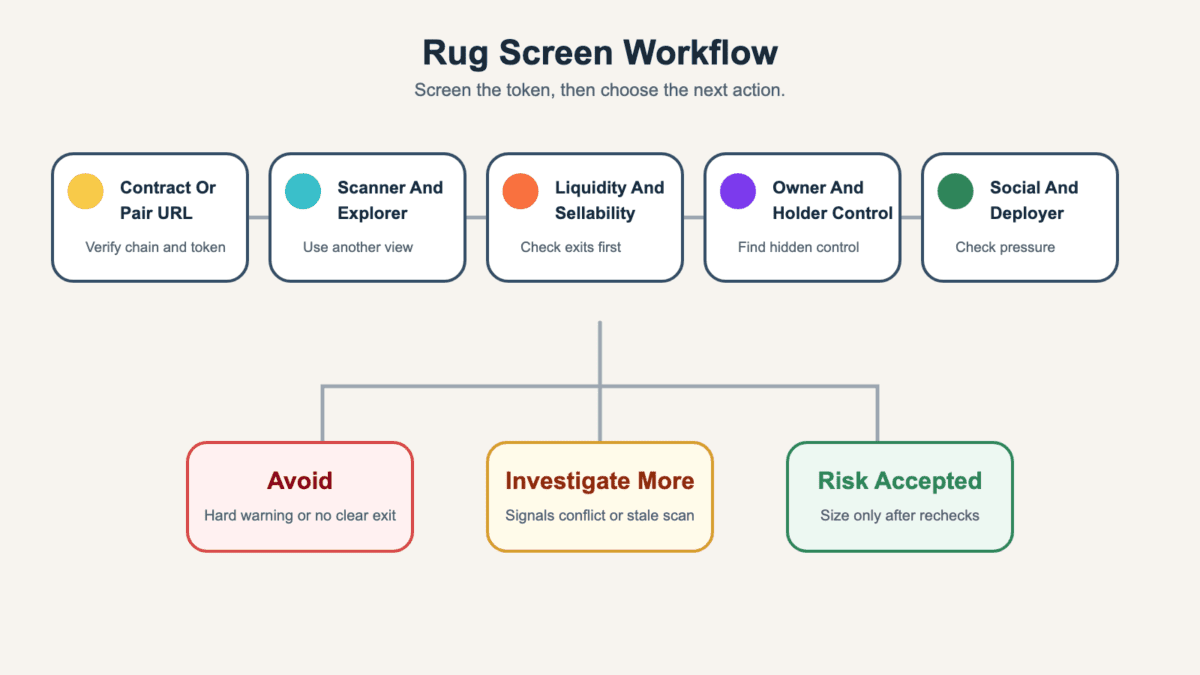
_A rug screen should narrow your next action, not pretend the token is safe._
The useful result is not always “buy” or “do not buy.” Sometimes the right answer is “wrong contract,” “stale scan,” “liquidity unclear,” or “owners still have too much control.” Those answers can save you from forcing a trade.
If the first tool looks clean, do not stop there. Run a second view before meaningful size. A token that passes a basic panel can still hide linked wallets, a short liquidity lock, a proxy upgrade path, or social pressure that turns late buyers into the exit.
The best rug screen signals are the ones that affect exits, control, and information quality. A warning is stronger when several signals point in the same direction.
One bad signal can be explainable. A fresh deployer wallet may be normal on a launchpad. A large top holder may be a pool, exchange, burn address, or vesting contract. The problem starts when sell restrictions, thin liquidity, holder clusters, and fake urgency all point the same way.
Use this table as a scanner-reading aid, not a verdict machine.
| Signal | What It Can And Cannot Prove |
|---|---|
| Liquidity Lock | It can show pool tokens are harder to remove, but it may expire or leave team supply untouched. |
| Sell Simulation | It can catch blocked exits now, but it may miss later tax or blacklist changes. |
| Mint Authority | It can show new supply may be possible, but it does not prove the power will be abused. |
| Owner Or Proxy Powers | It can reveal upgrade or control risk, but some contracts need limited admin functions. |
| Top Holders | It can expose concentration, but labels and linked wallets need explorer checks. |
| Bundled Buys | It can suggest coordinated supply capture, but bots and launch mechanics can add noise. |
| Deployer History | It can reveal repeated launches or linked failures, but a new wallet may hide history. |
| Social Proof | It can show demand pressure, but paid hype and copied communities are easy to fake. |
The table gives you a reading order. The real work is connecting those signals to the token in front of you.
Liquidity checks ask whether buyers have a realistic exit. A token can trade while the pool is too thin, too new, or controlled by someone who can remove the market’s other side.
Look at pool size, age, LP-token ownership, lock length, burn claims, and recent liquidity movements. A lock can reduce one direct pool-drain risk, but it does not stop insider wallets from selling tokens into public demand.
Exit liquidity risk is the trade hiding underneath that setup. If late buyers are the only real demand, the token can look tradable until bigger wallets try to leave.
Also compare liquidity with volume. A token doing huge volume against tiny liquidity can look alive until one sell breaks the chart.
Honeypot checks ask whether buyers can sell normally. A token that can be bought but not sold is the cleanest “close the tab” result a rug screen can produce.
For EVM tokens, watch transfer taxes, blacklists, whitelists, max-wallet rules, max-transaction rules, and pause functions. For Solana tokens, watch freeze authority and token-account behavior.
Small test sells can help high-risk traders, but they are not a magic shield. A contract can behave one way now and another way after a setting changes.
Control powers tell you who can change the token after launch. On Solana, mint authority can allow more supply. Freeze authority can restrict token accounts. On EVM chains, owner privileges, proxy contracts, and upgrade functions can change behavior after a clean first look.
Some controls have normal uses. The risk rises when they are undisclosed, unlimited, or paired with hype that tells buyers not to ask questions.
Do not read a single permission in isolation. Read it beside liquidity, holder distribution, and deployer behavior.
Holder checks ask whether supply is really distributed. Top-10 percentages are a start, but they miss linked wallets, bundled launch buys, shared funding sources, and fresh wallets acting as one group.
Add suspicious clusters together when the funding path or timing suggests coordination. Ten wallets with small balances can be more dangerous than one labeled wallet if they all trace back to the same source.
This is where a scanner often needs explorer support. Pretty charts are useful. Transaction history is less charming and more honest.
Deployer checks ask whether the launch wallet has a pattern. Repeated short-lived tokens, copied websites, recycled social accounts, and funding paths from known risky wallets should slow you down.
Social proof is weaker than it looks. Anonymous founders are not automatically scammers, but anonymity reduces accountability when paired with hidden wallets, vague allocation, and pressure to buy now.
Community takeover claims need the same skepticism. A real community can rescue a weak launch. A fake one can become the second act.
A token can pass a rug screen and still be risky because scanners only see the signals they check at that moment. A green score means “no checked failure found,” not “no future problem exists.”
Fresh tokens move faster than many tools refresh. Liquidity locks can expire. Owners can upgrade proxy contracts. Insiders can split supply across wallets. Paid communities can manufacture volume, holder count, and urgency.
Elliptic’s rug-pull detection research covered the $100 million LIBRA token scandal as a recent example of promotion and liquidity-pool mechanics turning into a rug-risk story. A retail rug screen can notice related warnings, but it cannot map every off-chain relationship or future wallet move.
Here is the green-score trap:
That slower pattern is closer to a soft rug than an instant pool drain. The token can remain tradable while trust, liquidity, and honest information weaken.
So use the pass result carefully. A clean rug screen can justify more research. It should not justify a large position, wallet approvals, or ignoring new warnings after launch.
A Solana rug screen starts with the mint address, the launch context, and the accounts that can still affect the token. Solana memecoins often move through launchpads, bonding curves, Raydium pools, trading terminals, and Telegram bots.
Start with the basic controls. Mint authority is the power to create more tokens. Freeze authority is the power to freeze token accounts. A bonding curve is a launch mechanism where price changes as users buy or sell before the token graduates to a wider pool.
Run the Solana checks in this order:
Solana-specific risk often hides in speed. A token can look clean in the first minute, then holder clusters, pool changes, or deployer movement appear after attention arrives.
Bundled buys deserve extra care. If several wallets bought at launch with related funding or timing, the holder list may look more distributed than the real control. A rug screen should count those clusters together instead of trusting the raw rank list.
Trading terminals and bots are useful for first-pass filtering. They can surface mint, freeze, pool, and holder data quickly. But the deeper check still belongs in an explorer when the trade is more than a throwaway amount.
An EVM rug screen starts with the contract address, verified source code, owner privileges, sell behavior, and LP-token control. Ethereum, BNB Chain, Base, and other EVM networks share similar contract patterns, so the warning signs often overlap.
Verified source code helps because scanners and users can inspect functions. But verified code does not remove risk by itself. A verified contract can still include owner controls, proxy upgrades, blacklists, tax changes, or pause functions.
Use this table to separate the main EVM checks.
| EVM Risk | Why It Belongs In The Rug Screen |
|---|---|
| Owner Privileges | The owner may change fees, limits, or trading settings. |
| Proxy Contract | Logic can be upgraded after the first scan. |
| Transfer Tax | Buyers may lose value entering or exiting. |
| Blacklist Or Whitelist | Some wallets may be blocked while others can trade. |
| Pause Function | Transfers can be stopped if the owner controls the switch. |
| LP-Token Control | Liquidity may be removable if LP tokens are not locked or burned. |
| Deployer History | Repeated launches can reveal a pattern a single token page misses. |
The table is only the first pass. Next, compare scanner output with the block explorer. Read recent transactions, ownership status, LP holder records, tax changes, and test-sell behavior.
Small test trades can reduce uncertainty, especially around sell taxes and slippage. They do not remove upgrade risk or holder risk. If the owner can still change the rules, the screen should stay yellow even after a successful sell.
When a rug screen flags a token, pause before turning the warning into either panic or bravado. A flag should narrow your next action: avoid, recheck, reduce size, or collect evidence if you are already exposed.
Some flags should end the trade. Blocked selling, active mint authority with no explanation, removable liquidity, hidden owner powers, and obvious linked insider wallets are not “alpha.” They are reasons to keep your wallet bored.
Use this triage:
Wallet safety deserves its own line. A scanner should not need broad wallet permissions just to show a public token report. If a site asks you to connect before revealing basic token risk, back out and use an explorer or trusted scanner instead.
If you think a screen missed a rug, save the contract address, pair URL, transaction IDs, screenshots, timestamps, deployer wallet, pool address, and any social posts that shaped the trade. That record can help with exchange support, wallet notes, tax records, or a later report. It is not exciting, but neither is reconstructing a bad trade from memory.
Related rug screen terms help you name the risk without mixing every bad outcome together. A hard rug, soft rug, honeypot, exit-liquidity setup, anonymous team, and doxxed founder claim can overlap, but they are not the same thing.
A hard rug usually points to direct destructive action, such as pulled liquidity, blocked selling, or malicious controls. A soft rug points to slower value extraction, fading delivery, or insiders leaving public buyers with weaker exits.
Exit liquidity describes the buyer side of the trap. If late users provide demand while earlier holders sell into them, the chart can look active right up to the point exits get ugly.
Team identity is another input. Working with an anonymous founder can be normal in crypto, but the screen should ask what else reduces accountability. Are allocations clear? Are permissions limited? Can holders verify who controls the largest wallets?
A doxxed team claim may add context, but doxxed team claims do not erase token permissions, holder concentration, or liquidity risk. Identity can reduce one unknown while leaving the contract free to cause problems.
These terms are most useful when they sharpen the next check. “Hard rug” should send you toward liquidity, sellability, and owner powers. “Soft rug” should send you toward team wallets, delivery, communication, and slow exits. “Doxxed” should send you toward whether the named people actually control the token responsibly.
The order is simple. Name the risk, then test the token. If the label does not change what you check next, it is probably just noise wearing a badge.
No. A rug screen is a fast pre-trade risk check, while an audit is a deeper review of code and security assumptions. A screen can flag obvious sell, liquidity, owner, and holder risks, but it does not replace contract review.
No. A rug screen can reduce obvious risk, but it cannot guarantee a token is safe. It may miss future contract changes, linked wallets, paid hype, stale data, or insiders who wait until after the scan.
The fastest rug screen starts with the contract or mint address, then checks sellability, liquidity, mint or owner powers, top holders, deployer history, and social pressure. If any major check fails, speed is telling you to leave faster.
Sellability and liquidity control usually come first because they affect whether you can exit. After that, holder concentration, owner powers, and deployer history decide whether the token still deserves more investigation.
A token can pass a rug screen and still dump because scanners cannot predict ordinary volatility, coordinated selling, paid hype, split insider wallets, lock expiry, or later permission changes. A clean screen is only one passed check.
Save the contract address, pair URL, transaction IDs, screenshots, timestamps, wallet addresses, pool address, and relevant social posts. That evidence is useful for support, records, and any later report.