Physical Address
304 North Cardinal St.
Dorchester Center, MA 02124
Physical Address
304 North Cardinal St.
Dorchester Center, MA 02124


Compute budget controls Solana transaction work and fee bids.
Compute budget in crypto is the amount of blockchain execution work a transaction can request, especially on Solana.
On Solana, the term usually points to compute units, compute unit limits, compute unit price, and the priority fee attached to a transaction. That sounds developer-heavy, but traders meet it when swaps fail, wallets show high-fee presets, or a bot says the transaction ran out of compute.
The useful version is simple: compute budget controls how much work a transaction may try, while priority-fee settings influence how hard it bids for scheduler attention. It can help. It is not a magic pass through congestion.
Compute budget in crypto means the execution allowance a transaction requests from a blockchain runtime. It answers a basic question: how much work can this transaction use before the chain stops it?
The phrase can confuse people because “compute budget” also appears in cloud spending, AI infrastructure, and software planning. In a crypto transaction, it is not a monthly server bill. It is a runtime cap.
A wallet user may never see the raw instruction. They might see a failed swap, a retry button, or a fee preset that quietly changes compute settings behind the screen.
For a builder, the same idea is more explicit. The transaction can include settings for the CU limit and the per-CU bid before the app sends it.
In practice, the term shows up in three ways.
A transfer is usually light. A swap through several accounts, token programs, and routing steps uses more work. A complex DeFi action can need even more.
The beginner trap is thinking compute budget is just “the fee.” The budget controls the work allowed. The compute unit price controls the extra bid per unit. The final fee depends on how those settings interact with Solana’s fee model.
So the plain takeaway is this: compute budget is the work limit, and priority-fee settings decide how much extra the transaction offers for that limit.
Compute budget works on Solana by setting a cap on how many compute units a transaction may consume. If the transaction needs more CUs than it requested, execution can stop with a compute-budget error.
Solana’s Compute Budget reference puts the current transaction cap at 1.4 million CUs and separates defaults by instruction type. It also lists the current scheduler block limit at 60 million CUs, which is why app-level compute choices can become a blockspace issue rather than a private developer setting. Built-in instructions can receive much smaller default allocations, while non-built-in program instructions commonly receive 200,000 CUs each.
Two default details are easy to miss.
Use these terms before reading any fee formula.
| Term | Plain Meaning |
|---|---|
| Compute unit | A unit Solana uses to meter transaction execution work. |
| Compute unit limit | The maximum CUs the transaction requests. |
| Compute unit price | The extra micro-lamports offered for each requested CU. |
| Requested CUs | The CUs reserved or capped by the transaction settings. |
| Consumed CUs | The CUs the transaction actually used during execution. |
| Transaction cost | Validator scheduling weight used before execution. |
| Base fee | The normal per-signature fee charged by Solana. |
| Priority fee | The optional extra fee created from CU limit and CU price. |
The important split is requested versus consumed. Requested CUs set the cap and affect priority-fee math. Consumed CUs show what the transaction actually used during execution.
That difference explains a lot of bad fee behavior. If the requested limit is too low, the transaction may fail. If the limit is much higher than needed while a CU price is set, the user can overpay for unused headroom.
The flow below shows how the settings move from wallet action to chain outcome.
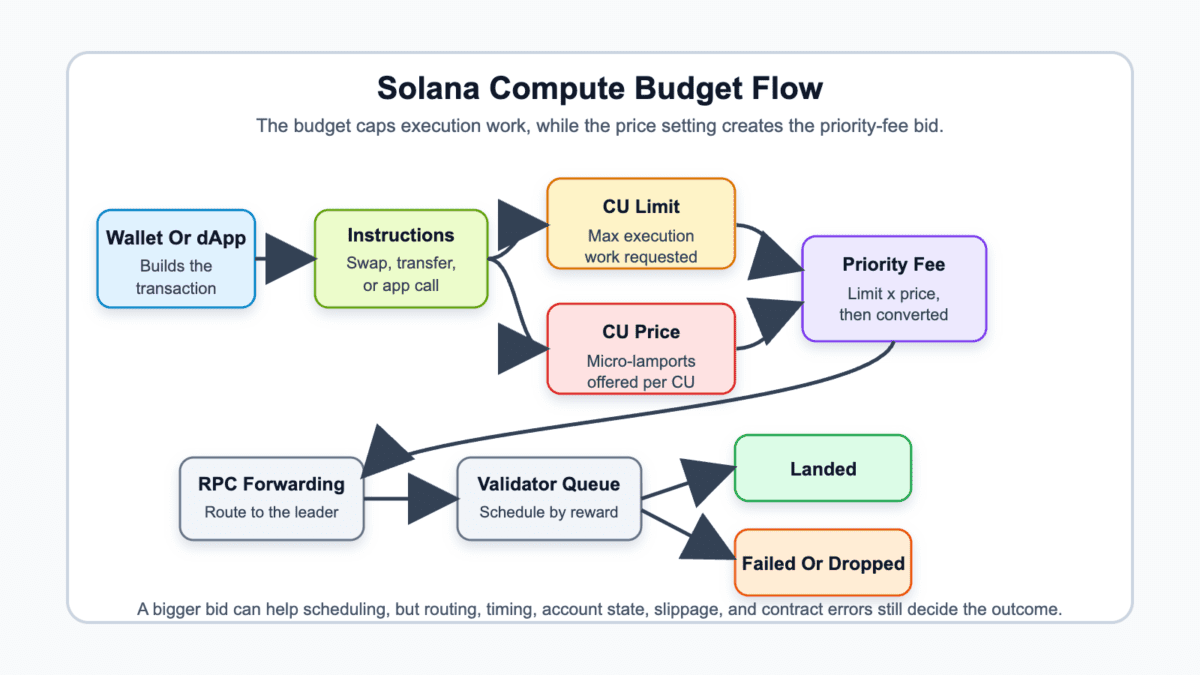
The diagram is deliberately boring. That is the point. Compute budget sits inside a chain of events, not above it. A clean CU limit can prevent one failure, but it cannot rescue every later step.
Compute budget affects Solana priority fees because the optional priority fee is based on the requested compute unit limit multiplied by the compute unit price. The higher either input goes, the higher the possible priority fee becomes.
In Solana fee math, the total transaction fee is the base fee plus the prioritization fee. The priority fee comes from compute unit price times compute unit limit, converted from micro-lamports into lamports.
The fee pressure comes from two inputs.
That sounds tiny until the CU limit is large. A user may raise the priority setting to push a swap through, while the wallet or dApp keeps a generous CU limit. The bid then applies to the requested limit, not a perfect measure of actual work.
Here is the fee map without the developer fog.
| Fee Component | What The User Should Know |
|---|---|
| Base fee | The normal Solana transaction fee, commonly tied to signatures. |
| Compute unit limit | The requested work cap used in priority-fee math. |
| Compute unit price | The extra bid per requested CU. |
| Priority fee | The optional fee created from limit times price. |
| Rent or account creation cost | Extra SOL may be needed when new accounts are created. |
| Total transaction fee | The base fee plus any priority fee and other required costs. |
The tradeoff is awkward but real. A low compute unit limit can make execution fail. A huge limit can make the priority-fee ceiling higher than needed.
For normal wallet users, this means a “high” setting is not always smarter. It may help when the transaction needed a stronger bid. It can also turn a routine retry into a more expensive guess.
For builders, the cleaner habit is to simulate the transaction, estimate actual CUs, then add a modest buffer. The goal is enough room to execute, not the largest fee cushion a UI can hide.
Compute budget is gas-like because it measures execution work, but it is not identical to Ethereum gas. Solana separates the work limit, per-CU priority bid, base fee, scheduling cost, and separate tip paths used in some trading flows.
That distinction saves users from one bad shortcut. Saying “just raise gas” makes sense in some Ethereum-style contexts, but on Solana a trader may be changing several levers at once. The wallet, dApp, bot, RPC, and transaction builder can each hide part of the machinery.
Use this comparison when a swap screen or trading bot throws several fee words at you.
| Concept | What It Controls |
|---|---|
| Compute budget | How much execution work the transaction can request. |
| Gas | A general analogy for metered blockchain work. |
| Compute unit limit | The maximum Solana CUs a transaction may consume. |
| Compute unit price | The extra bid paid per requested CU. |
| Solana priority fee | The optional fee that can improve scheduler priority. |
| Jito tip | A separate tip path used by many Solana trading flows. |
| RPC route | How the signed transaction reaches the network. |
| Slippage setting | How much worse the trade price may become before failing. |
A Jupiter or Raydium swap can make this clearer. The swap route may need enough compute to execute, a priority fee to compete during congestion, and maybe a Jito tip if the trader is using a tool built for competitive landing.
Those settings do different jobs. Compute budget stops execution from running out of room. Priority fee bids for scheduler attention. Jito tips can be a separate inclusion incentive. Slippage controls trade price tolerance.
Mixing them together creates expensive superstition. If the route is stale, the pool changed, or the transaction was not forwarded well, a bigger compute budget can simply make the miss cost more.
A higher compute budget can help a transaction avoid running out of execution room, but it cannot guarantee inclusion, confirmation, price execution, or profit. It solves one class of problem, not every problem in the landing path.
Solana traders feel this most during hot Solana meme-coin launches. Several users may touch the same pool, launchpad, or token accounts at nearly the same time. The trade can fail because the compute limit was too low. It can also fail because the route expired, the blockhash went stale, or the account state changed before execution.
That means a failed trade may point to several different problems.
The same pressure shows up in fast token markets, where fee presets, scanners, and bot settings move faster than calm thought. A fee slider can look like control when it is really only one lever.
Higher fees do not fix transaction logic, stale market data, weak routing, or bad trade quality. They may improve queue position, but they cannot rewrite what the transaction is trying to do.
Check these failure causes before raising fees again.
That last point is where PvP trading becomes expensive. You may beat the compute error and still land after faster wallets changed the price.
A trade can also land late and turn into exit liquidity for someone earlier. The transaction worked. The trade did not. Crypto has a talent for making both sentences true at once.
So raise compute settings only after you know which failure you are addressing. If the log says compute budget exceeded, more room can help. If the route is bad or the trade is stale, more room is just a pricier shrug.
Traders and builders set a smarter compute budget by matching the limit and fee settings to the actual transaction, not by jumping to the maximum. Normal users should usually start with wallet or dApp presets, then inspect failures before changing advanced settings.
For wallet users, the best first move is boring: keep enough SOL for fees and account creation, use normal presets in quiet periods, and raise priority only when congestion or the app’s own warning supports it. If you are comparing wallet settings, look for clear fee labels, transaction simulation, and failure messages that explain what went wrong.
The next step depends on who is changing the setting.
Use this checklist by audience.
SetComputeUnitLimit for the cap.SetComputeUnitPrice for the per-CU bid.The Compute Budget Program is the developer-facing tool behind these settings. Most users do not need to write its instructions by hand. They need to know when a wallet, app, or bot is changing those instructions for them.
The practical standard is enough, not maximum. Enough compute prevents budget failure. Enough bid improves scheduling odds. Maximum everything can become a fee bonfire with a nice UI.
Compute budget gives SOL investors a signal about transaction quality, fee pressure, and how efficiently Solana activity fits into blockspace. It is not a price predictor.
A network can show activity while users still fight failed swaps, wasteful CU limits, and noisy fees. That weakens the low-fee story because cheap transactions only help when they land cleanly. The investor read is narrow but useful: compute demand, fee pressure, and failed-transaction patterns can show whether apps are becoming efficient or merely busy.
Watch these signals with caution.
During market rotation, compute demand can spike because traders chase one chain, sector, or token style. That spike is information, but it is not proof of durable value.
The same caution applies to any narrative coin riding Solana activity. Busy blocks, higher priority fees, and crowded launches can show demand. They can also show bots, hype, and short-lived congestion.
So use compute budget as a network-health clue. It can help explain user experience and fee dynamics. It should not decide whether SOL, an app token, or a new launch deserves risk capital.
Related compute budget concepts help separate execution work from market outcome. The words often appear together in Solana trading, but each one controls a different risk. Gas is the broad analogy, blockspace is the scarce room inside blocks or slots, and transaction landing is the path from signed intent to on-chain inclusion.
Slippage is price tolerance. Priority fees and Jito tips are bidding tools, not guarantees.
Start with the problem you are trying to diagnose.
Wallets add another layer because they turn raw settings into buttons. A simple fee preset may hide the compute unit limit, compute unit price, retry behavior, and route quality. That is fine when the app explains failures clearly. It is dangerous when every miss becomes “raise the fee and pray.”
The connected idea is simple: compute budget is a transaction mechanic. It touches trenches trading, exit-liquidity risk, fees, wallets, and tiny SOL balances, but it does not replace those checks.
Start with compute budget by asking what failed: execution room, fee bid, route timing, balance, or trade logic. One setting cannot diagnose all five.
For normal users, the answer is usually not a raw compute instruction. It is reading the wallet error, checking fee presets, keeping a SOL reserve, and avoiding repeated retries after trade conditions have already changed.
First, separate the failure type from the fee feeling. A failed transaction can look the same in a wallet even when the cause is different under the hood.
Then change one lever at a time. Raising priority fee, widening slippage, changing RPC, and increasing the CU limit are different choices. If you change all of them at once, you may pay more without learning what fixed the transaction.
Use these actions before paying more.
If the issue was compute budget exceeded, more requested CUs can help. If the issue was slippage, stale route, missing balance, or contract rejection, raising compute budget is the wrong fix.
The best habit is to slow down one click. In Solana, fast is good. Fast and confused is just a donation with better latency.
Compute budget is the amount of execution work a blockchain transaction is allowed to request. On Solana, it usually means the compute unit limit plus related fee settings that affect priority.
Compute budget is gas-like, but it is not exactly the same as Ethereum gas. It measures requested Solana execution work, while the priority fee depends on the compute unit limit and compute unit price.
Your Solana transaction likely needed more compute units than the transaction requested. A retry may need a higher compute unit limit, but you should still check logs, account state, balance, route freshness, and slippage.
A higher compute budget alone does not make a Solana transaction faster. A higher compute unit price can improve scheduling priority, but routing, timing, account contention, and market changes can still stop or delay the transaction.
You can pay more when you request unused compute budget with a nonzero compute unit price. The priority fee is based on the requested compute unit limit, not only the CUs actually consumed.
Compute budget controls Solana execution work and priority-fee math, while Jito tips are a separate incentive path used in some transaction-landing flows. A trader may use both, but they solve different problems.