Physical Address
304 North Cardinal St.
Dorchester Center, MA 02124
Physical Address
304 North Cardinal St.
Dorchester Center, MA 02124

Understand Telegram mini app wallet risk before tapping.
A Telegram mini app is a web app that opens inside Telegram, usually from a bot, chat, or link, and may add payments, games, wallet connections, or other interactive services without a separate app install.
That makes Telegram mini apps feel casual. You tap inside a familiar chat, the screen opens quickly, and the whole thing looks less suspicious than a random link in a browser. But crypto changes the risk. The important question is not only what the app is, but what you grant, connect, sign, install, or pay once it opens.
A Telegram mini app is an app-like web experience that runs inside Telegram instead of sending you to a normal website or app store. It can look like a game, a checkout page, a dashboard, a rewards app, a trading tool, or a wallet-adjacent screen.
The simple version: Telegram provides the room, but the mini app provider still runs the service. That provider may be a serious project, a small builder, a trading tool, a game studio, or someone copying a trusted brand with less honorable hobbies.
Most users meet a Telegram mini app in one of a few familiar places:
Telegram then loads the app inside an in-app WebView, so it feels native even though the interface is built with web technology. That format is the main source of confusion.
A Telegram mini app can be harmless, like a voting tool or community quiz. It can also be crypto-facing, with wallet connections, token rewards, subscriptions, or trading actions. The format alone does not tell you which one you are using.
So the first check is basic but useful: ask what the app actually does. A game that tracks points is one thing. A wallet prompt asking you to approve a transaction is another. A DM link asking for a login code or seed phrase is not a quirky feature. It is a red flag wearing a badge.
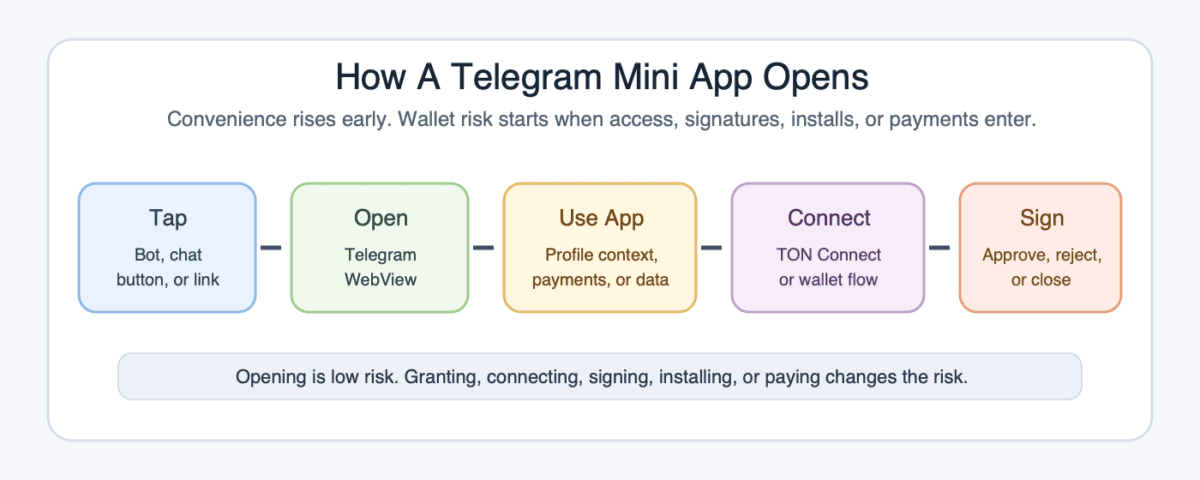
A Telegram mini app starts when you tap a bot button, chat button, profile link, menu item, or shared link. Telegram opens a web app inside its own interface, so you stay inside Telegram while using the service.
That in-app feel lowers friction. There is no app-store search, no browser tab to inspect, and no separate install step. That is useful for real tools, but it can also compress the pause where users normally check a URL.
The app may receive limited Telegram context, such as information needed to identify the session. It may ask for extra permissions, payments, or features depending on what the app does. A normal commerce app may only need a checkout flow. A crypto app may ask you to connect a wallet through a wallet-connection flow such as TON Connect.
The key split is action-based. Opening the mini app is one action. Granting access is another. Connecting a wallet is another. Signing a transaction is the step where crypto risk becomes real, because your wallet is being asked to approve something.
Keep these steps separate when you use one:
Mini apps often pair with bots because bots handle messages, menus, and commands well. The mini app handles the richer screen. That is why “Telegram bot mini app” shows up so often.
The bot can be the doorway, while the mini app is the actual interface. The same design can serve a useful product or a scam. Telegram makes access fast. It does not make the provider trustworthy by default.
A Telegram mini app is the interface layer. It can sit beside bots, wallets, dApps, mobile apps, and websites, but it is not the same thing as any of them.
This distinction saves users from bad safety assumptions. A wallet-looking screen inside Telegram does not prove Telegram controls the funds. A bot that launches a mini app does not prove the app is official. A crypto game with points does not prove there will be a liquid token.
Here is the clean comparison:
| Format | What It Means For The User |
|---|---|
| Telegram mini app | A web app opened inside Telegram. It may be informational, social, payment-based, gaming-focused, or crypto-facing. |
| Telegram bot | A message-based account that responds to commands, buttons, and menus. It may launch a mini app. |
| Telegram Wallet | A wallet service available through Telegram interfaces. It is separate from the mini app format itself. |
| Self-custody wallet | A wallet where you control the keys or recovery phrase. Mini apps may ask it to connect or sign. |
| DApp | A blockchain app that uses smart contracts. A mini app can be a front end for one. |
| Mobile app | A separate installed app from an app store or direct download. It has a different trust and permission model. |
The table shows why custody is the first serious split. If a Telegram mini app only displays a leaderboard, the main risk may be privacy or phishing. If it asks for wallet approval, you need to understand where the funds sit and what the signature permits.
For custody-heavy choices, a broader look at crypto wallets helps separate wallet type, recovery method, and transaction approval from the mini app interface. The interface is the button you press. Custody is where the blast radius lives.
Telegram mini apps matter in crypto because they put apps where crypto communities already talk, speculate, coordinate, and chase rewards. A project does not need to convince users to leave a chat before it can show a game, wallet flow, points dashboard, or checkout screen.
That distribution is powerful. A mini app can spread through channels, private groups, bot menus, and shared links. It can turn a chat room into a launch surface, which is why crypto builders use the format for games, rewards, creator tools, trading dashboards, and community tasks.
The common crypto-facing uses are easy to recognize:
The gaming angle is especially clear. Tap-to-earn apps, reward quests, and lightweight social games overlap with GameFi because users are doing simple actions in exchange for points, status, or possible tokens.
Telegram also fits crypto’s attention cycle. A token idea can move from a group message to a mini app, then to screenshots, referral links, and trading chatter in minutes. That is why the attention economy is a useful lens here.
Distribution can move faster than due diligence, which is very on brand for crypto and not always in a good way. A large user funnel can help an app find attention, test demand, and gather community activity. It does not prove revenue, security, liquidity, token design, or long-term use.
Useful Telegram mini apps reduce friction. Weak ones hide the hard questions until after you have already tapped Start.
Telegram mini app risk depends on the action you take. Opening an app is usually a lower-risk event than connecting a wallet, signing a transaction, entering a login code, installing an APK, or sending funds.
The danger is that all those steps can happen inside a familiar Telegram flow. A polished mini app can imitate a trusted project, fake a giveaway, copy a Fragment-like purchase path, or pressure users with a release fee.
BleepingComputer reported in May 2026 that Telegram Mini Apps had been abused for crypto scams and Android malware delivery. Telegram feels familiar, which is exactly why rushed prompts deserve more suspicion.
Use this ladder before you decide how much access to grant:
| Action | Risk Level And Practical Check |
|---|---|
| Opening a mini app | Lower risk, but still check the source link and provider name. |
| Sharing app data | Medium risk if the app collects profile context, task history, or contact-linked behavior. |
| Connecting a wallet | Higher risk. Confirm the wallet, app domain, and requested permissions. |
| Signing a transaction | High risk. Read the approval screen before signing anything. |
| Entering a login code | Very high risk. Telegram login codes should not go into random app flows. |
| Entering a seed phrase | Stop. A real mini app does not need your recovery phrase. |
| Installing an external APK | High malware risk, especially from DMs or reward pages. |
| Paying a release fee | Assume scam risk unless independently verified through official channels. |
The most common mistake is treating “connect wallet” like a login button. It is not. It may be harmless in some apps, but it can also set up approval requests that move assets or grant permissions.
Another common mistake is trusting urgency. A real app can explain what it needs. A rushed timer, private DM, fake support agent, or “pay to release funds” flow is usually telling you the quiet part loudly.
Telegram mini apps often appear beside TON because many crypto-facing apps in Telegram use TON wallets, TON Connect, Toncoin payments, or app-linked token ideas. That creates a simple story: Telegram has users, mini apps reduce friction, and TON sits close to the action.
That story can be true and still incomplete. Using a Telegram mini app is not the same as buying TON. Earning points in an app is not the same as receiving a tradable token. Joining a referral campaign is not the same as owning a claim on future revenue.
Keep those ideas apart:
TON Connect is best understood as a wallet-connection route. It helps a mini app ask a compatible wallet for approval. The important user moment is still the wallet prompt. If the prompt asks for something unclear, you do not need to be polite to the app. Close it.
Tap-to-earn and airdrop campaigns turn this into speculation. Many users keep tapping, inviting, and completing tasks because they hope the app will convert points into tokens. That behavior sits close to farming, where effort, activity, and wallet history are used to chase possible rewards.
Before you assume a Telegram mini app token has value, check the parts that decide whether a reward survives contact with a market:
Mini app tokens can also trade as story assets before proof arrives. That is where the narrative coin lens helps. The market may buy the Telegram distribution story first and ask about real usage later.
If everyone farms the same campaign and rushes to sell at launch, late buyers can become exit liquidity. That is the unglamorous side of airdrop season: points can be fun, but liquidity decides whether the fun pays.
Checking a Telegram mini app starts before you tap. The safest path is to reach the app from the project’s official channel, website, or verified announcement, not from a random DM or copied group message.
Then inspect what the app asks for. A mini app used for a quiz should not need a seed phrase. A points dashboard should not need your Telegram login code. A wallet flow should show a clear transaction request before you sign.
Use this checklist when the app touches money, wallets, rewards, or identity:
Small test amounts help, but they are not magic. A harmless test transaction does not prove the next approval is safe. Wallet prompts can change, contracts can change, and scam pages can wait until users relax.
For a normal utility app, the main question is whether it does the job and respects your data. For a crypto-facing app, add a harder question: what can this app cause my wallet, account, or funds to do?
Telegram mini app examples are best understood by category, not by a dated ranking. The useful set changes fast, and crypto has a gift for turning yesterday’s hot app into today’s abandoned button.
Normal utility mini apps can handle forms, bookings, quizzes, creator subscriptions, commerce, customer support, community tools, identity checks, and event access. They make sense when a group already lives in Telegram and the user should not need a separate app for a small task.
Crypto-facing mini apps add more sensitive use cases:
That does not make them bad. It means the risk moves with the feature. A mini app that only tracks a community task has a different risk profile from one that routes trades.
Games and reward apps are the easiest to understand. You complete tasks, tap buttons, invite friends, earn points, and hope those points later mean something. Some users enjoy the game. Others are quietly doing unpaid customer acquisition with extra steps.
Trading dashboards are more serious. A fast Telegram interface can make it easier to act on a call from a group. That speed can help active traders, but it can also make weak liquidity, slippage, and bad execution feel like normal chat behavior.
Commerce and subscription mini apps sit somewhere in the middle. Payments, Telegram Stars, creator access, and digital goods can be useful. The user still needs to know who is selling, what is refundable, and whether the payment method creates any wallet exposure.
The best example test is simple: if the same service opened in a normal browser, would you still trust it?
Telegram mini apps bring several crypto terms into one small screen. Knowing the terms helps you avoid treating every prompt as the same kind of risk.
These are the terms most likely to appear around the app:
Those terms matter because they point to different user decisions. A payment screen, wallet signature, points page, and marketplace link do not deserve the same level of trust.
Self-custody is the sharpest example. Control is powerful. It also means a bad signature is your problem, not a support-ticket warm bath.
No. A Telegram mini app is an embedded web app format, while Telegram Wallet is a wallet service available through Telegram-related interfaces. A mini app can display wallet-related screens, launch a wallet flow, or ask for a wallet connection, but that does not make the mini app itself the wallet. Separate the interface from custody before trusting any balance, transfer, or approval screen.
A Telegram mini app cannot drain a wallet simply because you looked at a screen, but it can become dangerous if you connect a wallet, sign a malicious transaction, enter a seed phrase, install malware, or follow a fake support flow. The wallet prompt is the key moment. If you do not understand what the approval does, close the app and verify from official sources.
No, Telegram mini apps are web apps inside Telegram, so the format itself is broader than one chain. In crypto, TON appears often because many Telegram-native projects use TON wallets, TON Connect, Toncoin payments, or app-linked rewards. That does not mean every mini app is a TON investment, a TON dApp, or a reason to buy a token.
Telegram mini app airdrops can be worth light testing if the project is credible and the tasks are low risk. They are not worth sharing seed phrases, paying release fees, installing APKs, or spending hours on unclear points. The real outcome depends on token conversion, allocation rules, liquidity, timing, and how many farmers try to sell at launch.
Opening a Telegram mini app is usually much lower risk than connecting a wallet or signing a transaction. Still, the source matters. Avoid links from random DMs, copied groups, fake giveaways, or support accounts. The risk rises when the app asks for permissions, login codes, wallet approvals, external downloads, or money.
Before connecting a wallet to a Telegram mini app, confirm the app from official project links, inspect the bot handle, read the wallet prompt, and use a low-balance wallet when testing. Never enter a seed phrase or Telegram login code. If the app cannot clearly explain why it needs a signature, the cleanest move is to close it.
Start with the source, not the pitch. If a Telegram mini app arrives through a DM, referral blast, or rushed giveaway, assume the link path needs checking before the app gets any trust.
Then choose your risk level. A simple game or community tool is one thing. A wallet-connected app with token rewards, trade buttons, or release fees deserves a slower inspection.
Use these steps before you touch money:
Telegram mini apps lower friction. They do not remove your job of checking trust.
The useful ones make crypto feel easier without hiding the important steps. The risky ones rely on speed, familiarity, and reward bait. If a mini app makes you rush, slow down. The button will still be there after you think.