Physical Address
304 North Cardinal St.
Dorchester Center, MA 02124
Physical Address
304 North Cardinal St.
Dorchester Center, MA 02124


Approval phishing is the bad-wallet-approval scam to catch before you sign.
Approval phishing is a crypto scam that tricks you into signing a wallet approval, letting an attacker-controlled contract move approved assets.
The confusing part is that your seed phrase may never leave your device. You can still lose funds because the signature you approved creates a valid on-chain permission.
That makes approval phishing feel less like classic password theft and more like a rigged checkout screen. The wallet did what you signed. The prompt was the problem: it hid, blurred, or rushed what the signature allowed.
Approval phishing in crypto is a permission scam. A fake app, claim page, message, or wallet prompt pushes you to approve a spender that should never touch your assets.
In a normal DeFi flow, a wallet may ask you to approve a token before a swap, stake, bridge, loan, or NFT listing. That approval tells a smart contract how much it can move and from which asset. Used correctly, it is routine dapp machinery.
Approval phishing twists that machinery. The attacker wants you to approve a malicious spender, sign a permit, or confirm collection-wide NFT access. The permission can target one token, a token amount, a whole NFT collection, or a newer signing path that looks less like a normal transaction.
Seed phrase theft is a different issue. If someone has your seed phrase or private key, the whole wallet should be considered exposed. Approval phishing can work without that. The attacker only needs one useful permission.
In June 2026, Chainalysis reported that Operation Atlantic identified more than 20,000 approval phishing victims across Britain, Canada, and the United States. For a normal wallet user, the lesson is simpler. This is not magic. It is a bad permission wrapped in a convincing story.
Ask the narrow question: which spender can move which assets, on which chain, for how much, and until when?
Approval phishing drains a wallet by turning a fake front end into a real on-chain permission. The attacker does not need the fake site to hold your funds. The site only needs to push the signature that creates access.
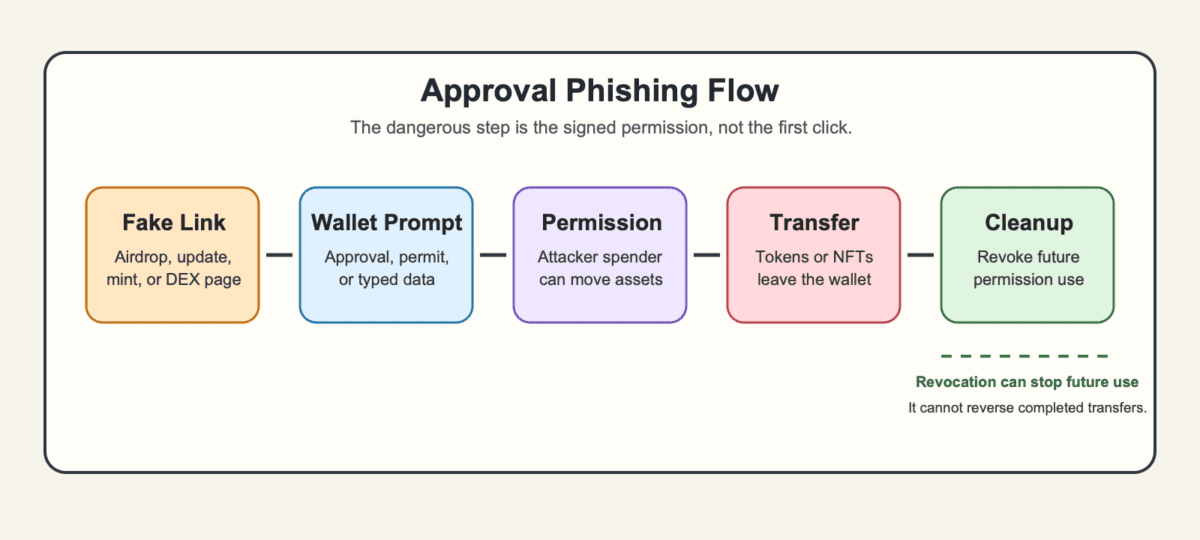
_Revocation can stop future use of an active approval, but it cannot reverse transfers that already happened._
The attack often starts with pressure. A claim window is closing. A wallet update looks urgent. A mint is live. A DEX page appears in a sponsored result. The first click is bait, but the expensive moment is the signature.
A common approval phishing path looks like this:
On-chain, the transfer can look valid because the wallet authorized the permission. That is why support teams may say the transaction was signed rather than hacked. That wording can sting, but it helps with diagnosis.
The delay changes the risk. A bad approval can sit quietly. If you later receive more USDC, bridge funds to that chain, or move NFTs into the same wallet, the attacker may use the old permission when there is finally something worth taking.
Approval phishing is not proof that every token approval is bad. Swaps, staking apps, bridges, lending markets, and NFT marketplaces often need permission before they can move a specific asset for a requested action.
The risk comes from the spender, the amount, the asset scope, and the deadline. A capped approval to a known app for one swap is different from unlimited USDT access granted through a fake claim page. Same approval family, very different blast radius.
Use the wallet prompt as a checklist, not a speed bump:
| Approval Type | What The User Should Check |
|---|---|
| Capped ERC-20 approval | Token, spender, amount, chain, and whether the app is the real one |
| Unlimited approval | Whether the convenience is worth the larger future loss if the spender is bad |
| Permit or Permit2 signature | Spender, token, amount, deadline, and any typed data you cannot read clearly |
NFT setApprovalForAll |
Whether the operator can move every NFT in that collection |
| Expired or revoked approval | Whether the permission is truly inactive on the chain where assets sit |
Unlimited approvals are common because they reduce repeated gas fees and wallet prompts. They are also generous to attackers. If the spender is malicious or later compromised, the old convenience becomes a larger open door.
NFT approvals have their own sting. One collection-wide approval can expose every item in that collection, not just the one you meant to list or move. That is a very expensive plural.
Approval phishing often starts after a wallet connection, but connection and spending permission are not the same thing. A connection usually lets a site see your public address and request actions. It should not, by itself, let the site move tokens.
But unknown connections still create risk. Once connected, a malicious page can keep pushing prompts until you accept one. The danger is usually the approval, permit, transaction, delegation, or seed phrase request that follows.
Here is the practical split:
| Wallet Action | What It Can Allow |
|---|---|
| Connect wallet | The site can view your address and request signatures or transactions |
| Sign message | You may prove address control or approve hidden typed-data permissions |
| Approve token allowance | A contract can move the approved token amount |
| Sign permit or Permit2 message | A signature can authorize spending without a normal send transaction |
Approve setApprovalForAll |
An operator can move a whole NFT collection |
| Enter seed phrase | Full wallet control can be lost |
So if you only connected to a suspicious site and signed nothing, the immediate risk is lower. Disconnect it, close the page, and avoid returning through the same link.
If you approved a token, signed typed data, or confirmed an NFT operator, check approvals on the affected chain. If you entered a seed phrase, the situation is worse. Move from a clean device and stop trusting that wallet.
Disconnecting after approval phishing removes a website’s local connection to your wallet. It does not erase the permission already written on-chain.
Think of disconnecting as closing the tab. Revoking is changing the permission record. You may need both, but they solve different problems.
Approval revocation also depends on the chain. An Ethereum approval, a Base approval, and a BNB Chain approval do not live in one universal inbox. You need to check the chain where the suspicious interaction happened, then check the asset or NFT collection involved.
Good wallets can make this easier by showing connected apps, spending caps, and approval controls clearly. Even then, you still need to know what you are removing.
Use this cleanup sequence when the signature is suspicious:
Revocation can stop future use of an active permission, but it cannot claw back tokens or NFTs already transferred. If the drain already happened, preserve evidence and report through official wallet, exchange, browser, regulator, or law-enforcement channels.
Ignore recovery DMs too. Real support does not need your seed phrase, and strangers with “guaranteed tracing” usually found you because you already look hurt.
Approval phishing red flags usually show up before the wallet prompt. Catch the setup first, then slow down before the signature makes it expensive.
The first warning is pressure. Fake airdrops, urgent verification pages, surprise eligibility claims, fake wallet updates, and “last chance” mints all push you to sign before you read. That is not a vibe check. It is the business model.
Social feeds make this worse. Impersonators, fake support accounts, and paid-looking replies can spread through crypto social feeds fast, especially around trending tokens or security scares.
Watch for these before signing:
Fast launch culture adds another layer. In fast token launches, fake mint pages and copycat DEX links can appear while users are racing for a position. Speed is useful for traders and wonderful for scammers.
The safer move is dull. Use bookmarks, official links, token addresses from trusted sources, and a low-value interaction wallet. If the prompt is unclear, reject it. You do not owe a mystery contract your portfolio.
After an approval phishing signature, stop signing anything else. The next prompt may be part of the same attack, or a recovery scam pretending to help.
Do not test the suspicious site with a small amount. Do not reconnect to “check.” Do not answer DMs from people offering to revoke, recover, trace, or negotiate. Get out of the scam flow first.
Then work through the response in order:
The right response depends on what you signed. A malicious USDC approval on Base does not automatically expose every token on Ethereum mainnet. A leaked seed phrase is different. A collection-wide NFT approval is different again.
If stolen funds touch a centralized exchange, fast reporting can matter. It still does not guarantee recovery. Keep the evidence clean and factual. Panic essays age badly in support queues.
If the wallet keeps receiving funds from other sources, assume any active bad permission may be watched. Revoke before refilling, or use a fresh wallet if you cannot confidently isolate the risk.
Hardware wallets help against approval phishing by keeping private keys off your computer and requiring physical confirmation. That lowers key-theft risk, but it does not filter every bad approval.
If you confirm a malicious approval on the device, the signed permission can remain valid after the device is unplugged. The hardware wallet protected the key. It did not guarantee that the approval was wise.
The weak point is often readability. Blind signing, raw typed data, cramped screens, and vague contract names can make a dangerous approval look routine. If the device cannot show the spender, asset, amount, chain, and deadline, the user is partly signing on trust.
That risk rises during claim pages and new DeFi sessions. A hardware wallet may ask you to confirm an approval, but the connected app still decides what information appears around that request. If the surrounding page is fake, the device can faithfully sign the wrong thing.
Better hardware-wallet habits are simple:
Hardware wallets still do their main job well: they protect keys. Approval phishing targets the step before the key signs, where the user still has to understand the permission.
Approval phishing examples often look normal because the lure borrows real crypto habits. Claims, mints, DEX swaps, staking pages, token launches, and wallet updates can all involve wallet prompts when they are legitimate too.
The difference is what the prompt grants. A real action should match the site, asset, spender, chain, and expected amount. A fake action asks for more than the moment needs.
Use these examples as pattern checks:
| Example | What To Check Before Signing |
|---|---|
| Fake airdrop claim | Whether the claim page is official, and whether it asks for unlimited spend |
| Fake wallet update | Whether the update came through the real app or a random link |
| Fake DEX or staking page | Whether the domain, token, and spender match the intended app |
| Random token bait | Whether the token pushes you to a claim site or approval page |
| NFT mint or listing prompt | Whether setApprovalForAll exposes a full collection |
| Permit2 or typed-data prompt | Whether the spender, deadline, and token amount are readable |
| Smart-wallet delegation prompt | Whether you understand what future actions the delegation allows |
Random token bait deserves calm handling. Receiving junk is not usually the drain. Interacting with it, clicking its link, or approving the attached contract is the trap. The same logic applies to junk-token dust: small junk can be harmless noise, tracking bait, or a doorway to a worse prompt.
Fake launches add pressure. A hype campaign may need late users to click, claim, and sign before they realize the pitch depends on their rushed participation. When urgency and wallet permissions arrive together, read twice.
Permit2 is not dangerous just because the name appears. It can reduce repeated approvals in legitimate flows. The risk appears when you sign a permit or typed-data message that names a spender, amount, token, or deadline you do not trust.
Approval phishing overlaps with wallet drainers, rugs, and seed theft, but the response changes by threat. Mixing them together can make you revoke the wrong thing or ignore the worse problem.
A wallet drainer is often the tool or malicious service that uses the permission. Approval phishing is the trick that gets you to grant it. Seed theft gives direct control. A rug usually comes from project insiders or contract design rather than a personal approval you signed.
Here is the cleaner split:
| Threat | How It Differs From Approval Phishing |
|---|---|
| Wallet drainer | The software that pulls assets after a bad signature or approval |
| Address poisoning | A lookalike address tries to make you send funds to the wrong recipient |
| Dusting | Tiny tokens or balances appear, often as tracking, spam, or bait |
| Hard rug | A project team or contract action removes value from holders |
| Soft rug | A project fades, extracts value, or abandons users without one clear drain |
| Seed phrase theft | The attacker may control the whole wallet, not one approval |
| Exchange-account compromise | Login or account security fails away from the self-custody wallet |
The rug comparison is useful because the attacker path is different. In a rug, the damage usually comes from project control, liquidity removal, minting, or hidden contract powers. In approval phishing, the user signs a permission that exposes their own assets.
That distinction is not about blame. It is about containment. If the problem is a bad approval, revoke and isolate the affected chain or asset. If the seed phrase leaked, abandon the wallet. If an exchange login is compromised, lock the account and rotate credentials.
Approval phishing sits beside several crypto safety concepts that users often mix together. Wallet hygiene covers the daily habits: smaller interaction wallets, separate vault storage, approval reviews, bookmarks, and refusing unreadable prompts.
Dust and spam tokens explain why random assets can appear without immediate wallet compromise. CT link culture explains how fake links spread through urgency, impersonation, and reply spam. Trenches-style token launches explain why users may rush through prompts before checking the spender.
Project-team theft points to a different kind of loss, where control sits with insiders, contract powers, or liquidity decisions. Exit liquidity explains the market side of being pulled into someone else’s exit.
Approval phishing is narrower. It starts with a permission that lets someone else move approved assets. Keeping that distinction clear tells you whether to revoke, move funds, abandon a wallet, lock an account, or simply stop clicking junk.
Yes. Approval phishing can move approved assets without stealing your seed phrase if you sign a permission that lets a malicious spender use them. The attacker does not need full wallet control. They need a useful approval, permit, or NFT operator permission.
Usually no. Connecting a wallet mainly exposes your public address and lets the site request actions. The dangerous step is signing an approval, permit, transaction, delegation, or seed phrase request. Still, disconnect from unknown sites because they can keep pushing bad prompts.
Receiving a random token is not usually enough to drain a wallet. The common trap is clicking the token’s website, following a fake claim link, or approving a related contract. Ignore, hide, or report spam through trusted wallet controls.
No. Revoking approvals can stop future use of an active permission, but it does not reverse transfers already completed. If funds already moved, preserve transaction hashes and scam URLs, then report through official wallet, exchange, regulator, or law-enforcement channels.
No. Unlimited approvals are common in legitimate DeFi because they reduce repeated approval prompts and gas costs. They become dangerous when the spender is malicious, fake, compromised, or no longer needed. Review old unlimited approvals regularly.
A hardware wallet can protect private keys and require physical confirmation, but it cannot stop approval phishing if you confirm the malicious permission. Use readable signing, trusted apps, separate vault funds, and smaller interaction wallets for risky claims or new dapps.
Start by changing the signing routine, not by swearing off DeFi forever. Approval phishing works because normal wallet prompts become rushed and unreadable. Make the routine slower where the money is real.
Pick the habits that reduce the most damage first. A separate interaction wallet limits what one bad prompt can touch. Approval reviews catch old permissions before a new deposit arrives. Bookmarks keep you away from search-ad copies of real apps.
Use these actions this week:
For larger wallets, set a review rhythm. Check approvals after a busy DeFi session, before moving new stablecoins into the wallet, and after any claim page that made you feel rushed. That is when old permissions become easiest to forget, especially if the wallet later receives assets that were not there during the first approval.
Then make one personal rule. If you cannot explain what the prompt allows plainly, reject it. You can always come back after checking. Your wallet will survive the extra minute, and so will the trade if it was real.