Physical Address
304 North Cardinal St.
Dorchester Center, MA 02124
Physical Address
304 North Cardinal St.
Dorchester Center, MA 02124


A practical guide to embedded wallets, custody, gasless UX, passkeys, and recovery checks.
An embedded wallet is a crypto wallet built into an app or website. It lets you create, access, and use a wallet without installing a separate extension or standalone wallet app first.
That smoother login does not settle the custody question. The wallet can still hold real assets, sign real transactions, and rely on recovery or transfer rules you only notice once money is already inside.
Here, embedded wallet means an in-app crypto wallet. It does not mean Apple Pay, a browser credential wallet, or a bank account. The check is simple: what does the app make easier, and what does it still ask you to trust?
An embedded wallet is a crypto wallet that lives inside another product. You might create it while signing up for a game, DeFi app, rewards tool, payment app, or trading interface.
Instead of installing MetaMask, Phantom, or another external wallet first, you log in with a familiar method. The app then creates or connects a wallet behind the scenes.
“Embedded” describes where the wallet experience appears. It does not prove who controls the private key, who can recover access, or whether you can export the wallet later.
Everything else follows from that split.
A current Fireblocks glossary frames embedded wallets around in-app asset holding and key-management infrastructure. It also describes MPC-style private key management as distributed across two or more parties, which is why custody labels still need a closer look.
For users, the sharper question is this: can you send funds out, inspect what you sign, recover access, and leave if the app changes rules?
If the answer is unclear, keep the first deposit tiny. A wallet hidden inside a friendly app is still a wallet.
That is why the first real check is not the login method. It is the exit path.
An embedded wallet works by making wallet setup part of normal app signup. The app handles the visible wallet screen, while a provider or wallet system handles key creation, signing, recovery, and policy controls.
That does not remove the blockchain. It only hides some of the steps that usually scare off first-time users.
Most embedded wallet flows start with email, social login, SMS, or a passkey. After signup, the system provisions a wallet address for that user.
The Coinbase Developer Platform separates user wallets from server wallets. That distinction comes first. A user wallet is meant to represent your actions. A server wallet is controlled by software on behalf of an app.
Behind the login, the wallet may use one private key, split key shares, multi-party computation, a trusted execution environment, a smart contract wallet, or another design. You do not need to memorize every acronym before using one.
But you do need to know which party can sign.
Once the wallet exists, the app shows actions such as receive, send, swap, mint, claim, approve, or spend. The signing prompt may look like a simple button instead of a separate wallet popup.
That smoother flow can be helpful. It can also make bad clicks faster.
Before signing, check what the app shows:
A good embedded wallet makes those details visible before the action. A weak one asks you to trust a button with a haircut and a nice font.
Recovery is where embedded wallets vary most. Some use passkeys, backup shares, email recovery, social recovery, provider recovery, or hardware-backed keys.
Passwordless wallet flows can combine email, social login, and passkeys with app-native wallet capabilities. Magic is one implementation, but the exact recovery path still depends on the app and provider setup.
Key export is a separate question. Recovery gets you back into the app. Export lets you move the wallet or key material elsewhere. Get both answers before you keep meaningful funds there.
Embedded wallets can also overlap with smart wallets and account abstraction. Embedded describes the app-native experience. Smart wallet describes programmable account logic, such as spending caps, batching, gas sponsorship, or recovery rules.
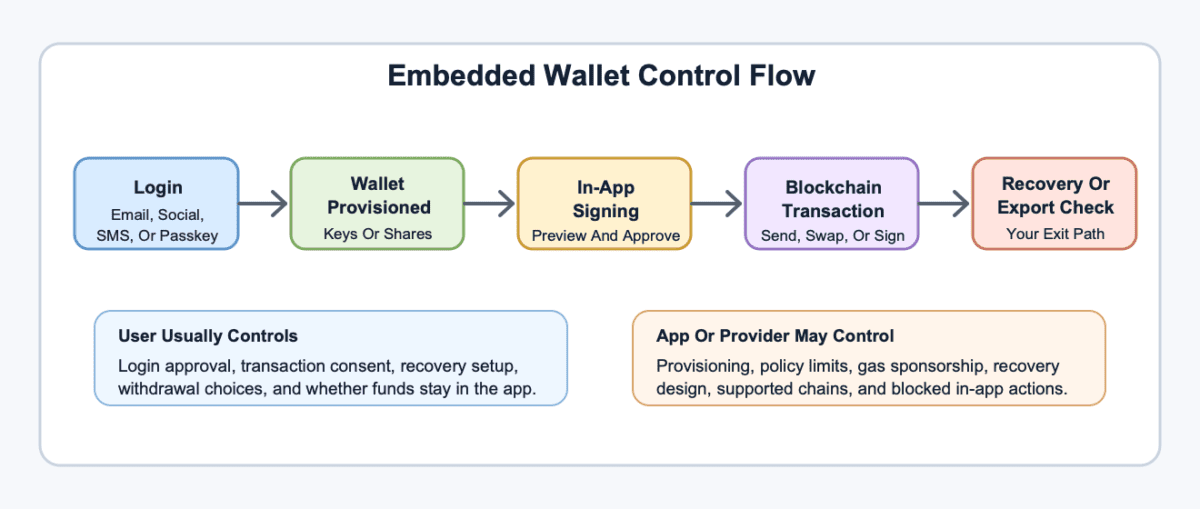
Embedded wallet custody depends on who can sign transactions, who can recover access, and who can block actions inside the app. The label “embedded” alone does not answer any of those.
Some embedded wallets are custodial. Some are non-custodial. Some split control through MPC or threshold signatures. Some use smart contracts with policies. Some mix user control with provider recovery.
Ask concrete custody questions before depositing more than test funds.
| Custody Question | What To Check |
|---|---|
| Who can sign transactions? | Confirm whether only you can approve actions, or whether the app, provider, or policy engine can sign or restrict them. |
| Can you export keys? | Look for key export, external wallet import, or another portable exit path. |
| How does recovery work? | Check whether recovery uses passkeys, email, backup shares, social recovery, support review, or provider intervention. |
| Can the app block actions? | Read how account locks, compliance flags, geo limits, or app policies affect transfers. |
| Which chains are supported? | Make sure the wallet can send and receive on the network where your assets actually live. |
| Can you transfer out? | Test a small transfer to an external address before storing meaningful funds. |
The table is boring on purpose. Boring is good when keys are involved.
If a wallet cannot explain signing, recovery, export, transfers, and policy limits in plain language, do not let the interface charm you. Convenience is not control.
An embedded wallet sits between familiar app login and full wallet control. It can feel easier than a browser wallet, but it may have more app or provider dependence than traditional self-custody.
If you are comparing wallet options, focus on control, recovery, and exit paths. The best wallet type changes with the size of the balance and how often you use it.
| Wallet Type | What Changes For The User |
|---|---|
| Exchange wallet | The exchange handles custody, login, recovery, and withdrawals, but it can freeze accounts or delay transfers. |
| Embedded wallet | The wallet appears inside an app, while custody and recovery depend on the provider design. |
| External self-custody wallet | You control keys and approvals directly, but you also handle backups, phishing risk, gas, and mistakes. |
| Smart contract wallet | Programmable rules can add recovery, spending caps, batching, or gas sponsorship. |
| Hardware wallet | Stronger long-term key protection, but slower and less convenient for frequent app actions. |
There is no universal winner. A small gaming balance, a stablecoin payment app, and a long-term Bitcoin stack do not need the same custody setup.
The right fit depends on amount, frequency, technical comfort, supported exits, and how clear the wallet is before each signature.
Apps use embedded wallets because normal wallet setup can stop users before they try the product. A seed phrase, extension install, chain switch, gas token, and approval popup can turn one signup into a small obstacle course.
Embedded wallet flows compress that setup into the app. A user signs in, gets a wallet, and can start with a balance, reward, item, or payment action.
That can help several app patterns:
The user-side tradeoff should stay visible in every example. Easier entry is useful for small app-native balances. It does not prove the wallet is safer, more private, or better for long-term storage.
For apps, embedded wallets can reduce support tickets about seed phrases and failed first transactions. For users, the benefit is faster access. The bill comes later if recovery, signing, gas, or withdrawals were vague.
Yes, you can lose crypto in an embedded wallet. Loss can come from bad approvals, unclear signing, unsupported chains, scam tokens, provider failure, account locks, recovery gaps, or simple user error.
The wallet design changes the failure path. It does not remove failure.
> Warning: if an embedded wallet hides transaction details, key export, or external transfer support, use it only for tiny test amounts until those answers are clear.
Approvals deserve special care. A smooth in-app prompt can still grant broad token access, create a risky session permission, or send funds to the wrong chain.
The same caution applies to project risk. An embedded wallet does not protect you from becoming exit liquidity in a thin token, or from a hard rug where a project vanishes with funds.
| Risk | What To Check |
|---|---|
| Blind signing | The wallet should preview asset, amount, destination, chain, fee, and permission scope. |
| Broad approvals | Look for spending caps, expiry dates, session limits, and a revoke screen. |
| Recovery failure | Test recovery before storing more than a small balance. |
| No key export | Confirm whether you can move the wallet or only withdraw assets through the app. |
| Provider dependence | Check provider identity, security history, and continuity options. |
| App policy blocks | Understand KYC, region limits, account freezes, and support escalation. |
| Wrong chain | Confirm the wallet supports the chain and token standard before sending funds. |
| Off-ramp friction | Know whether you must transfer to an exchange, use KYC, or pay gas first. |
A doxxed team is not a magic shield, but hidden operators add friction when something breaks. That risk grows when the same app controls wallet recovery, account policy, and user support.
Use the app’s wallet like a working balance until it proves otherwise. Serious funds deserve slower checks.
Embedded wallets often appear with “gasless” transactions because apps want users to act without first buying a chain’s native gas token. Gasless usually means the user is not directly paying gas in that moment.
The blockchain action is not free. The app, provider, sponsor, paymaster, spread, fee model, or some other party pays or absorbs the cost.
Here is a realistic stablecoin path:
Gas sponsorship works best when the app controls the narrow flow. It gets messier when you leave the app, switch chains, bridge assets, or touch unsupported tokens.
Stablecoins make the experience feel closer to payments, but wallet UX does not erase issuer risk, smart contract bugs, bridge risk, thin liquidity, or tax records. The wallet can smooth the entry. It cannot fix the asset or the market behind it.
An embedded wallet can make sense for small balances, repeat app actions, games, rewards, trials, stablecoin payments, and low-friction onboarding. It is less convincing for large long-term holdings unless custody and export checks are strong.
Avoid putting a large share of funds into a convenience-first wallet just because it was easy to start. In trading slang, going full port into an app wallet without checking exits is asking the UX team to moonlight as risk management.
Before you keep funds there, run this checklist:
Then split balances by job. Use the embedded wallet for app activity. Move larger holdings to stronger custody when the app is no longer the main reason you hold the asset.
That is not anti-embedded-wallet advice. It is matching the tool to the balance.
Embedded wallet conversations overlap with several nearby crypto terms. The key distinction is user experience versus custody, signing, and market risk.
Self-custody means the user controls signing authority and backup risk. An exchange wallet means the platform controls custody and account recovery. A smart wallet means programmable account logic. Account abstraction is the architecture that can support features such as passkeys, session keys, batching, and sponsored gas.
MPC splits signing power across shares, while a trusted execution environment protects key operations inside isolated hardware or software. Those terms sound technical because they are. The user question stays plain: who can approve a transaction, recover access, or stop a transfer?
Market terms still belong here because a polished embedded wallet can sit inside a weak app. A soft rug can unfold slowly through broken promises, while anon dev risk grows when users cannot tell who controls the project, provider, or recovery path.
A dead coin shows what can happen when an app token loses demand, support, or usable exits. A bagholder is the person still holding after that exit gets ugly. And a lottery ticket mindset helps keep tiny speculative app balances from turning into serious savings by accident.
Other terms are about usage friction. Gasless transactions may hide network fees from the user. Tiny leftover balances, game assets, and rewards flows show why apps use embedded wallets: constant wallet popups are poison for casual users.
Learn the surrounding terms so the app cannot blur them into one soft-focus promise. Wallet convenience is useful. Wallet control is separate.
Start with an embedded wallet by testing the exit path, not the prettiest feature. A smooth login tells you almost nothing about signing authority, recovery, or whether you can move funds out.
If the wallet is only for an app reward, that may be enough. If it will hold tokens you bought, stablecoins you spend, or assets you plan to keep, make the wallet prove itself first.
Use these first actions:
If one step fails, stop adding funds until you understand why. A failed transfer, missing recovery path, or vague signing screen is not a minor UX flaw when the balance is real.
After that, inspect the signing prompts. A good embedded wallet should show asset, amount, destination, chain, fee, and permission scope before approval.
Then decide the wallet’s job. It may be perfect for game items, rewards, app credits, or stablecoin spending. It may be the wrong place for a long-term balance that would hurt to lose.
The rule is simple: use convenience for convenience, and use stronger custody for serious storage.
An embedded wallet is a crypto wallet built into an app or website, so you can hold, receive, send, or sign crypto actions without installing a separate wallet first.
The app may use email, social login, SMS, or passkeys to make the wallet feel like a normal account. That does not automatically tell you who controls recovery or signing.
An embedded wallet can be non-custodial, but it is not automatically non-custodial. The custody model depends on key management, recovery, provider access, and app policy.
Check whether only you can sign transactions, whether the provider holds a recovery share, and whether you can export keys or send funds to an external wallet.
Yes, you can lose crypto in an embedded wallet through bad approvals, account lockouts, unsupported chains, scams, recovery failure, provider problems, or sending assets to the wrong network.
Reduce the risk by testing with a small amount, reading transaction previews, limiting permissions, and confirming the transfer-out path before storing more.
No, an embedded wallet is not the same as a smart wallet. Embedded describes where the wallet appears, while smart wallet describes programmable wallet logic.
An embedded wallet can use a smart wallet underneath, but it can also use other key-management designs. Ask what account type and recovery model the app uses.
Embedded wallets still use blockchains, so network fees usually exist. A gasless flow means the app or sponsor may pay the fee for that action.
The cost can still appear through limits, spreads, service fees, or failed transactions. You may also need native gas tokens when moving funds outside the app.
An embedded wallet is usually better for small app-native balances than large long-term holdings. Larger balances need stronger custody, clear recovery, and a tested exit path.
Before using one for meaningful funds, confirm key export, external transfers, transaction previews, provider continuity, support, and supported chains.