Physical Address
304 North Cardinal St.
Dorchester Center, MA 02124
Physical Address
304 North Cardinal St.
Dorchester Center, MA 02124


Check crypto eligibility without trusting every claim link.
An eligibility checker is a crypto tool that tells you whether a wallet, account, or profile appears to qualify for an airdrop, reward, allocation, or claim.
That sounds simple until a claim link asks for wallet access. The result can help, but it does not prove the page is official, the token has value, or the next signature is safe.
An eligibility checker in crypto is a tool that checks whether a wallet address, account, or user profile qualifies for a token airdrop, points conversion, reward, allocation, or claim window. It is a wallet-status lookup, not a generic benefits-screening page.
The result usually answers one question: does this wallet appear to match the rules? It may check a past snapshot, token holdings, trading activity, staking status, campaign tasks, or a project allocation list.
The answer has limits. An eligibility checker can say you qualify, but the claim may not be open yet. It can show a reward, but the token may be illiquid. It can show a green result, but a copied claim page can still be malicious.
Crypto users usually run into four types of checkers:
Those categories do not carry equal trust. Official project pages are best for final claims, while scanners and community tools are leads. Useful leads, sure. Still leads.
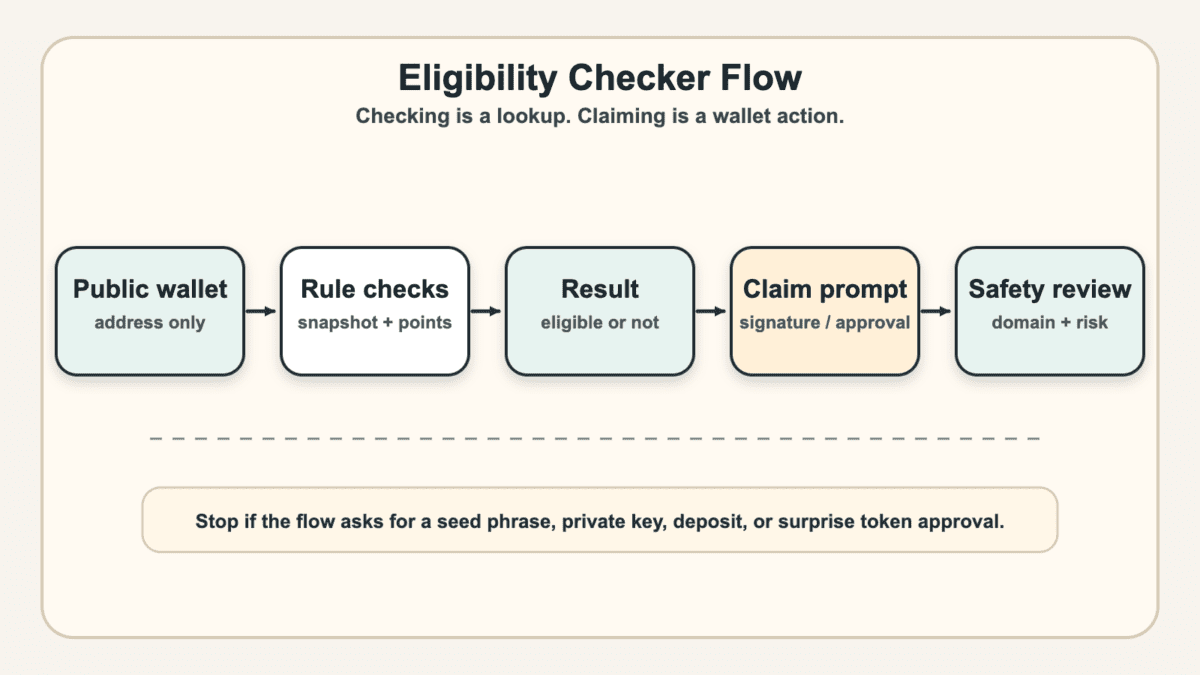
An eligibility checker works by comparing public wallet or account data against a project rule set. A basic wallet eligibility checker can read a public address, while a claim flow may also ask you to connect a wallet to prove ownership.
Behind the result, the checker may inspect an airdrop snapshot, token holdings, points, bridge activity, staking records, task completion, or anti-sybil filters. That is why token airdrop eligibility can feel personal even when the process is mostly rules and databases.
Many airdrops reward activity, but repeated activity can also look farmed. If you want the broader behavior behind that, farming explains why wallets interact with projects before a token exists.
The signals below are common in an airdrop eligibility check:
| Signal Checked | What It Usually Means |
|---|---|
| Public wallet address | The checker reads visible on-chain history. |
| Snapshot date | The project froze eligibility at a past point. |
| Token or NFT holdings | The wallet held a required asset. |
| Points or campaign tasks | The account earned credit before a cutoff. |
| Staking status | Assets were bonded, delegated, or locked as required. |
| Anti-sybil filters | Linked or farmed wallets may be removed. |
| Allocation proof | The wallet appears in a distribution list. |
A stronger checker explains which rule affected the result. A weaker one only shows “eligible” or “not eligible” and pushes you toward a button.
Keep the steps separate. Reading a public address is different from connecting a wallet, signing a message, approving a token, and sending a claim transaction.
An eligibility checker verifies whether a wallet or account appears to qualify. An airdrop checker usually searches for possible token drops. A claim page starts the transaction that actually receives, registers, or activates the allocation.
Those terms overlap because many product pages combine them. A single page may let you paste an address, show possible rewards, connect a wallet, and then send you into a claim transaction.
Here is the clean split:
| Tool Type | What It Is For |
|---|---|
| Eligibility checker | Tests whether a wallet, account, or profile matches rules. |
| Airdrop checker | Searches possible token drops or past allocations. |
| Crypto airdrop checker | A broader scanner for many projects or chains. |
| Wallet dashboard | Monitors one or more wallets inside an app. |
| Claim page | Starts the actual claim, registration, or transaction. |
The risk changes as the page moves down that list. A public airdrop checker can be low risk when it only reads an address. A claim page needs more caution because it can request signatures, approvals, gas, or contract interaction.
So inspect the prompt, not only the page title. “Airdrop eligibility checker” can be honest wording, but fake pages use honest wording too. Annoying, but very on brand for scams.
Use an eligibility checker safely by starting from an official source, checking the domain, and refusing any request for a seed phrase, private key, deposit, or surprise token approval. Safety comes before the free-token confetti.
A public address lookup is usually the lowest-risk path because the address is already visible on-chain. Connecting a wallet can still be normal on an official claim page, but it gives the page more room to ask for dangerous actions.
If you use multiple wallets, keep the valuable one boring. Use separate wallets for claims and routine testing. If you are still mixing long-term holdings with every new link from social feeds, the wallets category is a better detour than another claim button.
Use this prompt table before you continue:
| Prompt Or Request | What To Do |
|---|---|
| Public address field | Check the domain and paste only the address. |
| WalletConnect request | Confirm the app name, chain, and domain. |
| Gasless message signature | Read the message and reject vague text. |
| Token approval | Avoid unlimited spend and unknown contracts. |
| Claim transaction | Check gas, contract, token, and destination. |
| Seed phrase or private key | Close the page immediately. |
| Deposit to claim | Close the page and assume a scam. |
Do a simple pre-check before every airdrop eligibility check:
The boring routine is the point. Most wallet losses do not start with a grand heist scene. They start with a rushed click on a page that looked close enough.
Public address checks only read visible data. Wallet connect lets a page see your address and request actions. A signature proves control, while an approval can give a smart contract permission to move tokens.
That ladder is the safety line. A gasless signature can be harmless if it only proves ownership on an official page, but you still need to read it. A token approval deserves more suspicion because it can grant spending power.
Claim transactions are not automatically bad. They are how many real airdrops work. But the contract, chain, token, amount, and gas cost should make sense before you confirm anything.
Stop immediately if the page asks for a seed phrase, private key, remote screen access, or a deposit to release tokens. No honest eligibility checker needs the keys to your house just to check the mailbox.
An eligibility checker says not eligible when your wallet does not match the rule set the tool is checking, or when the tool has stale, incomplete, or chain-specific data. It does not always mean you did nothing useful.
The most common causes are boring and frustrating: wrong wallet, wrong chain, missed snapshot, too few points, assets held on an exchange, unstaked funds, region blocks, or anti-sybil filtering.
Use the table to narrow the reason before you chase a support thread:
| Likely Cause | What To Check |
|---|---|
| Wrong wallet | Try the address that actually used the app. |
| Wrong chain | Match the checker to Ethereum, Solana, Cosmos, Sui, or the target chain. |
| Missed snapshot | Compare activity dates with the cutoff. |
| Too few points | Check task, volume, or usage thresholds. |
| CEX-held tokens | Exchange accounts may not expose your wallet activity. |
| Staking issue | Confirm bonded, delegated, or unbonding status. |
| Region restriction | Read official terms and do not fake location data. |
| Anti-sybil filter | Linked wallets or repetitive patterns may be excluded. |
| Claim timing | The checker may be live before claims open. |
| Stale third-party data | Wait for updates or verify through the official page. |
The airdrop snapshot is the big one. If the project took the snapshot before your activity, later usage usually will not count for that round.
Exchange custody creates another common mismatch. Holding tokens in a centralized account may not count as your own on-chain wallet activity, even if the asset appears in your exchange balance.
If an eligibility checker says eligible, verify the official claim path before you connect, sign, or spend gas. Eligible means your wallet appears to qualify. It does not mean the reward is claimable today or worth claiming.
Move through the result in order: eligible, claimable, vested, tradable, and worth the risk. Those words are not synonyms. A crypto claim checker may show a positive result while the claim window, vesting schedule, or trading venue still creates friction.
Run this short sequence before you act:
Then think about the market side. A claimed token can become exit liquidity if early recipients rush to sell into thin demand. Holding blindly can turn you into a bagholder, and some rewards fade into dead coin territory after the first wave of attention.
That does not mean every claim should be sold on sight. The eligibility result and the trade deserve separate checks. Claim mechanics, tax records, liquidity, and wallet safety all deserve a minute before you click the shiny button.
An eligibility checker can be wrong when it is unofficial, stale, missing chains, using estimated rules, or checking a rumored airdrop before the project has published final criteria. Third-party results are leads, not verdicts.
This is common with rumored airdrops. A dashboard can show useful wallet activity, rank, points, or contract diversity, but those numbers do not prove a future allocation. Final eligibility usually comes from the project’s official checker or claim page.
Rumor-driven discovery often spreads through Crypto Twitter before official links exist. That can help you find early signals, but it also spreads fake checkers, copied screenshots, and confident nonsense at broadband speed.
Watch for these wrong-result cases:
The fix is familiar: verify through official project channels, compare the address and chain, and wait for final claim rules. A good unofficial checker can save time. A bad one can sell certainty it does not have.
Eligibility checker scams usually copy a real airdrop, fake a project domain, or push users from a safe-looking lookup into a dangerous wallet prompt. The goal is not to check eligibility. The goal is to get permission.
The obvious stop signs are seed phrase, private key, and deposit requests. The quieter risks are unlimited token approvals, fake support DMs, sponsored search ads, reply-thread links, and copied posts that point to a lookalike domain.
For scale, the FBI reported that complaints involving cryptocurrency produced more than $11 billion in losses in 2025. Fake eligibility checker pages belong in that very expensive scam channel, not in the harmless pop-up bucket.
Theft setups can look like a hard rug when a malicious page goes straight for funds. Other campaigns stay alive longer, teasing claims while support and delivery fade.
Close the page when you see any of these:
Team identity can help, but it is not a safety guarantee. A public founder may reduce some trust risk, while an anonymous link in high-risk trading circles deserves extra suspicion.
Also watch the long con. A slow abandonment can leave users with a live token, weak support, and no useful exit. The checker did not drain you, but the claim still turned into dead weight.
Track eligibility with a simple wallet routine, not a panic-click habit. The goal is to know what you did, where you did it, and which official channels can confirm a future claim.
Good tracking reduces both FOMO and wallet risk. It helps you find old activity without connecting your main wallet to every new airdrop checker with a countdown timer and suspicious urgency.
Build a routine you can repeat:
The social side is noisy by design. Airdrop campaigns often reward attention before value becomes clear, and every dashboard can start to feel like a miniature slot machine.
Market narratives add pressure too. When a hot chain, wallet category, or points program becomes the trade of the week, eligibility chatter can outrun official facts.
Your routine should slow that down. Check official pages, record what matters, and let low-value claims stay low priority. Not every “eligible” badge deserves a wallet signature.
Related eligibility checker terms help you separate the lookup, the claim, the risk, and the market outcome. Once those pieces are clear, the result becomes less mysterious.
Airdrop snapshot is the cutoff point that decides which wallet activity counts. Merkle proof is a common way for a claim contract to verify allocation without listing every detail on the page. Anti-sybil filtering removes wallets that look farmed, linked, or abusive.
Wallet approval is the permission that can move risk from checking into spending authority. Claim window is the period when eligible users can act. Vesting means the tokens may arrive or become usable over time, not all at once.
The terms below are worth knowing before you chase another checker:
Use those ideas as checks, not as extra tabs to hoard. The article you need next depends on the problem in front of you: eligibility, wallet safety, claim timing, or the token’s actual market quality.
An eligibility checker can be safe when it only reads a public address or runs through a verified official page. It becomes riskier when it asks for wallet connection, signatures, token approvals, or claim transactions. Check the domain, start from official channels, and refuse seed phrase, private key, deposit, and surprise approval requests.
No. An eligibility checker does not need your seed phrase. A real checker can use a public address, wallet connection, or signed ownership proof depending on the flow. A seed phrase or private key request means the page is trying to take wallet control. Close it immediately.
The eligibility checker may say your wallet is not eligible because you used the wrong address, missed the snapshot, used the wrong chain, held assets on an exchange, failed a points threshold, or hit a region or anti-sybil filter. Check the official rules before assuming the result is final.
Yes, many eligibility checker tools let you paste a public wallet address without connecting anything. That is usually the safer first step. You may still need wallet connection later for an official claim, but checking and claiming are separate actions.
Eligible means the eligibility checker thinks your wallet matches the rules. Claimable means the claim window is open and the wallet can act. A wallet can be eligible before claims open, after claims close, or while tokens are vested, restricted, or not yet tradable.
Usually, no. Avoid using a high-value main wallet for unfamiliar claims. If the official flow requires the same wallet, verify the domain carefully, read every prompt, and check approvals afterward. For smaller or uncertain claims, a separate low-value wallet is safer.