Physical Address
304 North Cardinal St.
Dorchester Center, MA 02124
Physical Address
304 North Cardinal St.
Dorchester Center, MA 02124


A plain-English guide to Solana PDAs, seeds, bumps, and program-controlled accounts.
A program-derived address (PDA) is a deterministic Solana address created from seeds and a program ID so a program can control account state without a private key.
You see PDAs around token vaults, metadata accounts, app settings, escrow flows, and explorer transaction lists. Read the phrase as “program-controlled address”, not “mystery wallet with a hidden owner”.
A program-derived address (PDA) is a Solana address that a program can derive again and again from the same inputs. Those inputs usually include short seed values, the program ID, and a bump.
The address itself is just an address. A PDA account exists only when an account is created at that address, funded, and assigned to the right owner program. That distinction causes a lot of beginner confusion, so use this quick split before reading code or explorer data.
| Term | What It Means |
|---|---|
| PDA | A deterministic Solana address derived by a program. |
| PDA Account | An account created at that PDA address. |
| Program ID | The program address used as part of the derivation. |
| Seed | A chosen input, such as a label, wallet address, mint, or order ID. |
| Bump | A small extra value used to find an off-curve address. |
| Wallet Account | A user-controlled account backed by a keypair. |
So a PDA is not automatically a token vault, user profile, or escrow account. It becomes useful when a Solana program creates or checks an account at that derived address.
That is why the same term appears in both developer docs and wallet support threads. Builders use PDAs to organize state. Users notice them when a transaction includes an unfamiliar account that seems to hold assets or authority. The useful check is which program derived it, which inputs were used, and what account sits at that address now.
A program-derived address (PDA) works by turning predictable inputs into an address that Solana treats differently from a normal keypair address. The program can find the same PDA later, but no person can sign from it with a secret key.
The flow starts with seeds. A program might use a label like vault, a user’s wallet address, a token mint, or an order number. Then it combines those seeds with the program ID and a bump.
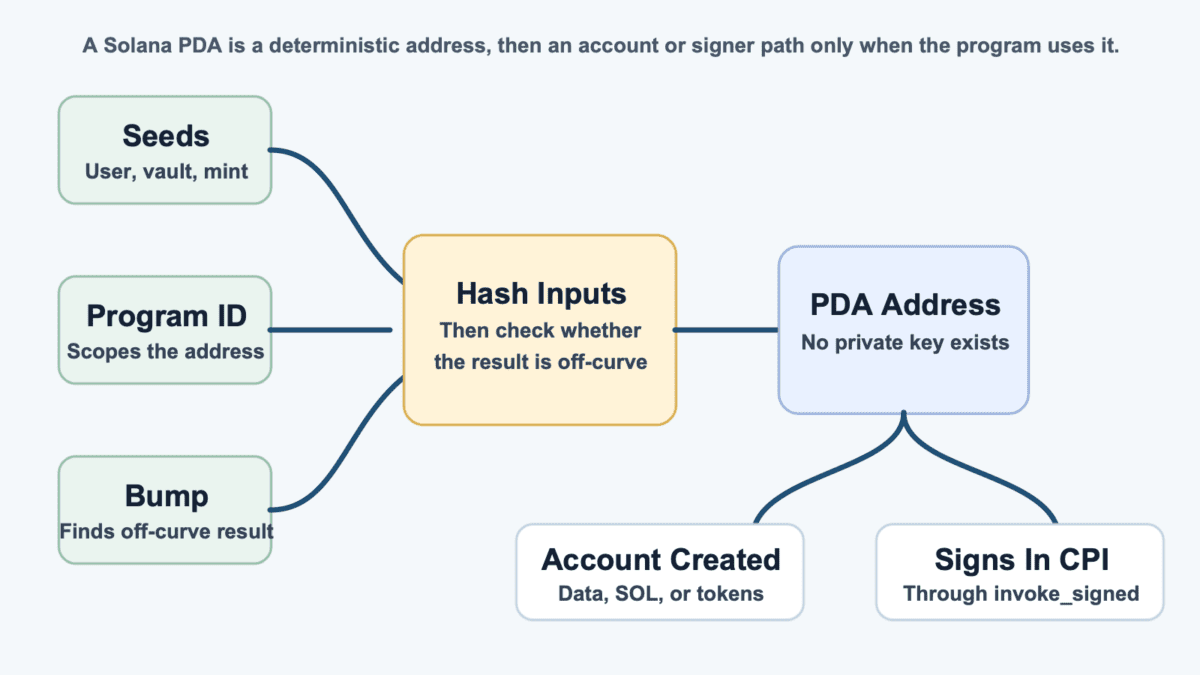
Solana Documentation defines the mechanical details: seeds and the program ID are hashed with SHA-256, the result must fall off the Ed25519 curve, and each derivation can use up to 16 seeds with each seed up to 32 bytes.
If the first result lands on the curve, the bump changes the input and tries again. The canonical bump is the first valid bump found by the standard search. That keeps everyone deriving the same expected PDA for the same seed set.
The program ID scopes the PDA. Two programs can use the same seed text and still derive different addresses because the program ID is part of the input.
That design keeps “vault” from becoming one global address across Solana. The vault PDA for one program belongs to that program’s derivation space, while another program’s vault PDA is separate. If you already know procedural programming, the pattern is familiar: choose inputs, derive the PDA, check the account, then execute only if the account matches the expected path.
A PDA signs only inside the Solana runtime during the right program call. The program uses invoke_signed during a Cross-Program Invocation, or CPI, and supplies the seeds and bump that match the PDA.
That does not produce a private key. It tells the runtime, “this program can authorize this PDA for this instruction because the derivation matches.” If the seeds, bump, program ID, or account do not match, the signer path fails.
A program-derived address (PDA) differs from a wallet account because a wallet has a private key, while a PDA does not. A wallet user signs transactions. A PDA is authorized through program logic.
This difference gets blurry because both can appear as addresses in explorers. Both can be associated with accounts. Both can hold assets if an account exists and the program rules allow it. Here is the cleaner comparison.
| Account Type | How Control Works |
|---|---|
| Wallet Account | A user signs with a private key or seed phrase. |
| Keypair Account | A generated keypair controls the address. |
| Program Account | Executable code lives at the program’s address. |
| PDA Account | A program controls the address through matching seeds and runtime checks. |
| Token Account | Token program rules decide balances and authorities. |
The word “owner” also needs care. On Solana, an account owner is the program allowed to modify that account’s data. That is not always the same thing as a human owner with a wallet app.
For wallet users, the check is simple. If an app says a vault is PDA-controlled, confirm which program owns the account, which authority controls tokens, and whether the address matches the expected program. That distinction is also why normal wallets language can mislead when it gets mixed with program-controlled accounts.
> A PDA cannot open your wallet and send a normal transaction. Your wallet still signs your own actions, and the PDA can act only through the program path that controls it.
Seeds, bumps, and off-curve checks are the three terms that make program-derived address (PDA) examples look harder than they are. Seeds define the address. The bump helps find a valid PDA. Off-curve means no private key can exist for that address.
Think of seeds as labels that make a program’s filing cabinet predictable. A program might use user plus a wallet address for a user profile, or vault plus a token mint for a vault account. The main pieces work like this.
| PDA Piece | Plain-English Role |
|---|---|
| Seed | A chosen input that makes the PDA deterministic. |
| Program ID | The program that owns the derivation space. |
| Bump | The extra byte used to find an off-curve address. |
| Off-Curve Address | An address with no corresponding private key. |
| Canonical Bump | The standard bump that gives the expected PDA. |
Seeds are usually public because secrecy is not the security model. The security comes from program scoping, off-curve derivation, account ownership, and validation.
Public seeds let clients, explorers, and other programs derive the same expected address. That is useful for profiles, vaults, metadata, escrow records, and app settings.
Public does not mean careless. Seeds should be unambiguous. If a program uses variable text chunks without separators or fixed lengths, different seed lists can accidentally collapse into the same bytes before hashing.
The canonical bump closes a subtle gap: more than one bump can sometimes produce an off-curve address for the same seed idea. If a program accepts any valid bump, an attacker may pass a different PDA than the program intended.
That mistake can turn into account substitution. The program thinks it is using the real vault, profile, or record. The attacker passes another valid-looking account that fits weaker checks.
> Use the canonical bump and store or verify it consistently. A PDA is only as safe as the validation around it.
For non-builders, the takeaway is simpler. When a dApp claims PDA safety, the important part is not that seeds exist. The important part is whether the program checks the exact PDA, owner, bump, token authority, and account state before moving funds.
A program-derived address (PDA) shows up anywhere a Solana app needs predictable program-controlled state. It helps a program find the right account without storing a giant address book somewhere else.
You may see one in explorer account lists, app transaction details, token vault flows, metadata records, and escrow transactions. A strange address is not automatically a scam. It usually means you need to identify the program and account owner before trusting the claim.
The context changes the meaning. A PDA describes how the address was derived, not what the account is for. The same pattern can support app settings, escrow authority, or metadata, while the risk depends on the owner, token authority, and validation path.
Common PDA uses include these patterns.
Associated token accounts deserve a careful mention. An ATA is a deterministic token account convention tied to the associated token account program. A PDA is the broader Solana concept of a program-derived address, and many app-specific accounts use PDA logic in different ways.
Tiny leftover balances can also confuse the picture. A closed or unused flow may leave small balances, rent remnants, or dust around account activity, depending on the account path and token behavior.
> A PDA linked to a known metadata program tells a different story from a random “vault” address promoted in a chat. Same plumbing, very different trust surface.
Program-derived address (PDA) risk usually comes from bad validation, not from someone stealing a secret key. There is no PDA private key to steal. The danger is a program accepting the wrong account as if it were the right one.
That risk is easier to understand as a mismatch between what the program thinks and what an attacker passes into the instruction.
| Mistake | What Can Break |
|---|---|
| Wrong Seeds | The program may derive or accept the wrong expected account. |
| Missing Owner Check | An attacker can pass an account controlled by another program. |
| Non-Canonical Bump | A different valid PDA can replace the intended account. |
| Arbitrary Account Input | The program trusts a supplied address instead of deriving it. |
Wrong seeds::program |
A cross-program PDA check can point at the wrong program. |
| Weak Token Authority Check | A vault may not be controlled by the authority users expect. |
| Reinitialization Bug | An account can be reset or claimed after setup. |
The classic mistake is accepting an account because it “looks close enough.” That is not a check. A Solana program should derive the PDA from expected seeds, verify the bump, confirm the owner, and validate the account data it is about to trust.
Anchor can make this cleaner with account constraints, but it does not remove judgment. A constraint that checks the wrong seed, skips authority, or trusts client-supplied data still leaves a hole.
> A PDA can enforce a narrow rule very well. It cannot save a program that lets users bring their own fake vault to the party.
Token vaults need extra attention. A vault PDA may be correct, but the token account authority can still be wrong, missing, or changeable under program rules. That is where “PDA-controlled” language can sound safer than the actual setup.
For users, the risk signal is vague authority language. If a project cannot explain which program controls the PDA, who can upgrade the program, and what prevents wrong-account substitution, the technical term is not enough. For builders, the fix is boring and strict.
Checking a program-derived address (PDA) starts with matching the address to the program context. You are not trying to find a private key. You are trying to confirm that the account belongs to the expected program path.
A normal user cannot fully audit every Solana program from an explorer screen. But you can catch a lot of weak claims before money moves. Use this checklist when a dApp, vault, or support thread points at a PDA.
The account owner field is a strong first clue. If the account owner is not the expected program, the rest of the claim needs a slower read. Token authority is just as important because a token account can exist at a sensible address while its authority points somewhere surprising.
Also check whether the app names the program clearly. If a site says “funds are safe in a PDA vault” but will not name the program ID, upgrade authority, or validation path, the claim is incomplete. Keep the habit boring: verify the program, send a tiny amount first, and distrust PDA claims from random DMs, fake support accounts, or rushed launch threads.
A program-derived address (PDA) proves only that an address can be derived and controlled through a specific program path. It does not prove the whole app is safe.
That distinction keeps a technical feature from becoming a trust badge. A PDA can be real while the token is unfair, the admin keys are powerful, the program is upgradeable, or the market is thin enough to punish late buyers. It also does not prove the items below.
A dApp can use the correct PDA for a vault and still carry upgrade risk. If an admin can swap program logic, change token authority, or pause withdrawals, the address model is only one part of the safety check.
Users usually meet this phrase in marketing copy, not audit notes. If “PDA-controlled” appears beside a new token or vault, ask what rule the PDA enforces and what the program can still change.
For non-developers, the sharper takeaway is market risk. A correct PDA can secure one address path, but it cannot prevent hype, bad liquidity, insider selling, or users becoming exit liquidity for a weak market.
So read “PDA-controlled” as a narrow technical claim. Then ask the wider questions: who controls upgrades, how funds move, whether token authority matches the promise, and what happens if demand disappears.
Start by matching program-derived address (PDA) checks to your role. A wallet user, app evaluator, and Solana developer need different checks.
Your role changes the question in front of you. A wallet user asks whether an unfamiliar account can drain funds. A developer asks whether the program derives, owns, and validates the account correctly. A token buyer asks whether the vault claim changes market or admin risk. Usually, it does not.
If you are a wallet user, focus on program IDs, account owners, token authorities, and whether the address appears in a known app flow. You do not need to derive every PDA by hand before making a normal transaction. If you are evaluating a dApp, slow down around vault language because a real PDA can still sit inside weak upgrade rules or poor initialization logic. Use these next steps.
If a source cannot show the expected program ID or authority model, stop there. A PDA claim without those details is just fancy packaging.
For a first pass, keep one rule. A PDA is useful when it makes program control explicit. It is risky when it becomes a magic word for “trust us”.
A program-derived address (PDA) in Solana is a deterministic address derived from seeds, a program ID, and a bump. It has no private key, so a program controls it through runtime checks rather than normal wallet signing.
A program-derived address (PDA) is an address first. It becomes a PDA account only when an account is created at that address, funded, and assigned under Solana’s account rules.
A program-derived address (PDA) has no private key because it is intentionally derived off the Ed25519 curve. That prevents a normal keypair from signing for the address.
Two different programs should not derive the same program-derived address (PDA) from the same seeds because the program ID is part of the derivation. The same seed text can produce different PDAs under different programs.
A PDA bump in Solana is the extra byte used during derivation to find an off-curve address. The canonical bump is the standard bump that produces the expected address for a given seed set.
No. A program-derived address (PDA) can make one program-controlled address path clearer, but it does not prove the app is audited, upgrade-safe, fairly launched, or free from bad validation.