Physical Address
304 North Cardinal St.
Dorchester Center, MA 02124
Physical Address
304 North Cardinal St.
Dorchester Center, MA 02124

DexScreener explained for chart speed without hidden risk.
DexScreener is a crypto market scanner for decentralized exchange pairs, used to track live charts, liquidity, volume, transactions, and newly created trading pairs.
That speed makes DexScreener useful for early token research. But a chart only shows visible activity. It cannot prove a token is safe, liquid tomorrow, or sellable through your wallet. Use it as the first screen before harder checks, not a green button with candles.
DexScreener is a pair-level charting and discovery tool for decentralized exchange markets. Instead of waiting for a token to appear on a centralized exchange, users can inspect trading pairs that already exist on DEXs.
That pair-level detail is the useful part. A token may trade against SOL on one pool, ETH on another, and a stablecoin on a third. DexScreener organizes those markets so you can compare price action, liquidity, volume, transactions, pair age, and token profile details in one place.
Keep the roles separate before you click anything:
That last point is not trivia. Many tokens share names, symbols, and recycled branding. The address gives you the exact market before the story gets expensive.
A ticker search can still help, but it belongs after the address check, not before it. The goal is to read the market you meant to inspect, not the loudest copycat using the same letters.
DexScreener works by organizing public DEX market activity into searchable token and pair pages. The page is a readable layer over on-chain trading behavior, not the place where liquidity appears by magic.
A DEX pair is a market between two assets. On Solana, Ethereum, Base, BNB Chain, and other chains, those pairs usually rely on liquidity pools where assets sit ready for swaps.
That is why a token contract is only the first piece. The market becomes readable when a pair exists, liquidity is added, and trades start flowing through a DEX. DexScreener then turns that activity into charts and metrics.
The normal path looks like this:
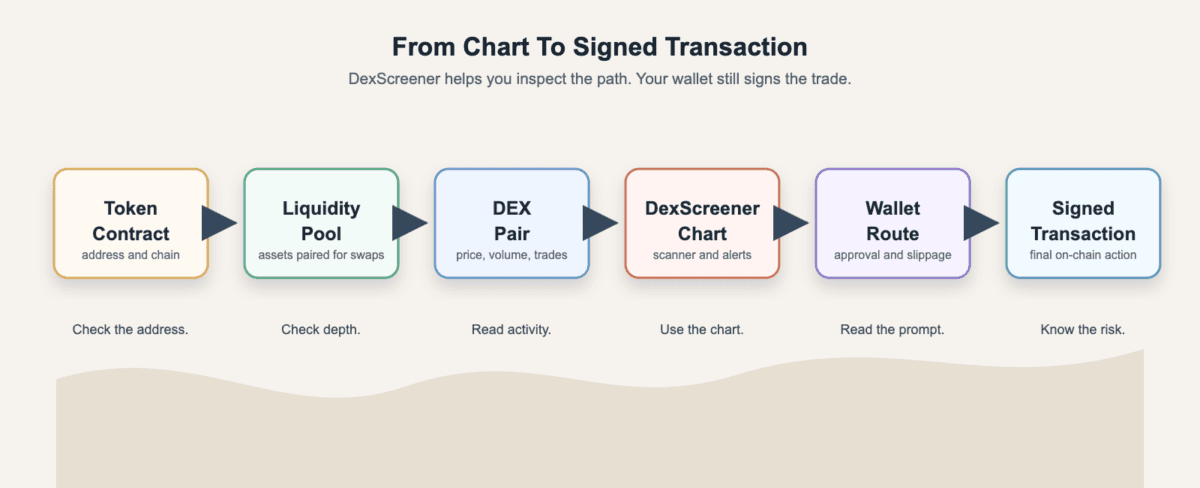
DexScreener data comes from DEX pair activity, token metadata, and indexed market signals. The visible page can show price, transactions, volume, liquidity, FDV, market cap estimates, pair age, token profile details, and boosts where available.
For scale, the DEX Screener API reference lists pair, search, and token-pair endpoints with a 300 requests-per-minute rate limit, which is useful for dashboards but still not a substitute for contract or holder checks.
The catch is simple. Indexed data is still interpreted data, so a few limits stay in play:
New tokens can appear on DexScreener before centralized exchange listings because DEX trading does not require the same listing process. If a token contract and DEX pair exist, market data may become visible before any large venue touches it.
DEX Screener’s token listing guidance focuses on token profiles, enhanced token info, and listing-related updates. That is different from a traditional exchange review.
Early visibility has two sides:
Read a DexScreener chart by asking what each signal can show and what it cannot prove. The chart should slow you down before any candle starts acting persuasive.
Pair age tells you how long that exact market has existed. A fresh pair can be early, but it can also be unstable, botted, or unfinished. Read “new” as a risk label before it becomes an opportunity label.
Liquidity tells you how much depth sits in the pool. More liquidity can reduce slippage, but it does not prove liquidity will stay. Thin liquidity can turn a normal exit into a bad lesson about exit liquidity.
Volume shows trading activity, but it does not prove organic demand. Bots can trade with themselves, small wallets can spam tiny orders, and launch teams can try to make a market look busier than it is.
Makers and transactions add texture. More unique makers can be healthier than one noisy wallet, but size, timing, and buy-sell balance still matter.
Use this table as a first-pass scan, not a verdict machine:
| DexScreener Signal | How To Read It Without Overtrusting It |
|---|---|
| Pair age | New markets can move fast, but early pairs carry higher failure risk. |
| Liquidity | More depth can help entries and exits, but it can still move or fragment. |
| Volume | Activity can signal interest, but bots and wash-like trades can inflate it. |
| Makers | More wallets can be useful, but they may still be small or coordinated. |
| Transactions | Buy-sell flow helps, but one side can vanish when liquidity thins. |
| FDV or market cap | Valuation context helps, but supply inputs can mislead. |
| Timeframes | A huge short-term move can be a warning, not a victory lap. |
The table is most useful when signals disagree. High volume with weak maker quality, tiny liquidity, or one-sided sells is not a clean setup.
FDV and market cap can help size the market story, but they can mislead on fresh tokens. Supply may be unclear, locked tokens may be ignored, and the displayed number can look tidy while the exit is ugly.
Timeframes create another trap. A token can be green over one window and brutal over another. A giant candle can warn that late buyers are arriving after the easy move, while a red chart still needs recovery evidence before it becomes a bargain.
DexScreener is safest when you use it to view public market data and do not sign anything. Risk rises when you follow links, connect a wallet, approve a transaction, or land on a fake site.
Fake DexScreener domains are a serious beginner risk. A scam page can copy a chart, push a wallet connection, and make the dangerous step feel normal.
Use a short safety routine before connecting:
dexscreener.com yourself or use a saved bookmark.This is where a clean wallet setup helps. A separate trading wallet, small balances, and careful approvals reduce damage if a link is wrong.
Viewing a DexScreener chart does not move assets. A wallet prompt can, so that is the line to watch.
Some pages include routes or buttons that help you reach a swap interface. The route may involve a DEX, aggregator, wallet, token contract, and slippage settings. Read the prompt before approving, then check the asset, chain, amount, permission, and destination. If the prompt asks for broad approval when you expected only a simple swap, stop.
A real DexScreener page can still point to a risky token. The chart can show market behavior, but it cannot audit every contract, identify every insider wallet, or promise that liquidity remains after you buy.
That does not make the chart useless. It makes DexScreener the first screen in a safer workflow, not the final answer.
DexScreener boosts and trending signals are visibility signals. They can tell you something about attention, promotion, and activity, but they do not turn a token into a safe trade.
In crypto launch talk, “DEX paid” usually means paid DexScreener visibility, token profile work, or boost-style promotion. It does not mean a DEX approved the token.
DEX Screener’s boosting guide describes boosts as a way to increase a token’s visibility and affect its trending score for a limited period. Use that context to separate information from attention: a paid profile can help identify socials or images, but it does not prove the team is honest.
Trending can reflect activity, attention, profile quality, traffic, boosts, or other ranking inputs. It is a discovery filter, not a background check.
Read visible signals like this:
| Visible Signal | What It Does, And Does Not, Prove |
|---|---|
| Boosted | Shows paid visibility or active boosts, not token quality. |
| Token profile | Can organize links and branding, but branding can still be fake. |
| Trending rank | Shows attention or ranking context, not safety. |
| Golden-style highlight | Shows boosted visibility, not stronger liquidity. |
| Active orders | May show paid products, not buyer protection. |
Boosts can make a token easier to notice. They should also make you more curious about who benefits.
DexScreener cannot prove that a token is honest, liquid, sellable, fairly distributed, or safe to hold. It can show symptoms. It cannot explain every cause.
High volume can look like demand, but some markets are noisy by design. Repeated tiny trades, strange timing, and volume that does not match real liquidity can point to fake or weak activity.
This is common in fast meme-coin markets where attention is the product. A chart can look alive while the market is still a PVP market with little room for late buyers.
Useful checks include:
Liquidity shown today may not stay tomorrow. It can be thin, fragmented across pools, controlled by a few wallets, or pulled quickly.
That is where hard rug risk enters the conversation. A sudden liquidity pull can leave holders trapped even if the chart looked active a few minutes earlier.
A slower failure can be different. A project may drift, stop supporting the market, or let liquidity and attention fade into a soft rug. DexScreener can show the decay, but it cannot prevent it.
Contract risk sits outside the chart. Mint controls, transfer restrictions, taxes, blacklists, holder concentration, and related wallets need separate checks.
The chart may show that people are buying. It may not show whether selling is blocked, insiders control supply, or a small cluster can dump into everyone else.
DexScreener is useful for discovery, monitoring, and first-pass market checks. It works best when you use it to form better questions before you trade.
DexScreener can help you find new pairs, compare duplicate tickers, watch liquidity changes, and set alerts for markets you are tracking. That fits early DEX markets where a token can start moving before wider listings appear.
This is also why the tool shows up around trading in the trenches. A saved chart is easier to evaluate than a random link dropped into a chat with eleven rocket emojis.
DexScreener can help you track which narratives are getting real DEX activity. If several tokens in the same theme start gaining liquidity and volume, the market may be rotating toward a crypto meta.
That does not mean every token in the theme deserves money. Separate leaders, copycats, and obvious traps before the theme becomes an excuse.
The DexScreener app can be useful for monitoring charts, alerts, and quick checks. Mobile is less ideal when you need several screens, explorer checks, wallet prompts, and route comparisons at once.
Scalpers may pair DexScreener with faster execution tools. Beginners usually need the opposite: more friction, not less.
DexScreener alternatives are best understood as companion tools, not one-for-one replacements. Each category answers a different question around the same trade.
Block explorers and contract scanners help inspect what DexScreener cannot fully explain. They can show contract details, transactions, holder distribution, authority flags, and wallet behavior.
Use them when the chart raises a question. If liquidity looks thin, holder concentration looks odd, or sells behave strangely, the next stop is rawer data.
Wallet analytics can show who is buying, selling, or rotating across tokens. DEX aggregators can compare routes and execution costs before a swap.
| Tool Category | What It Adds Beside DexScreener |
|---|---|
| Block explorer | Raw transactions, contract pages, and wallet history. |
| Contract scanner | Risk flags, permissions, taxes, and authority checks. |
| Wallet analytics | Holder behavior, wallet clusters, and smart-money context. |
| DEX aggregator | Route comparison, slippage view, and execution path. |
| Execution terminal | Faster order flow, hotkeys, and trade management. |
No single tool owns the whole workflow. The chart shows visible market action. Companion tools check the parts that can hurt you after the chart looks fine.
Execution terminals and exchange tools can be faster than DexScreener for active trading. They may add hotkeys, limit orders, route controls, or portfolio views.
Social tools can shape the first click because many charts arrive from X, Telegram, Discord, or trading chats. Let social attention start the question, then make the data earn the next click.
Use DexScreener as a checklist surface before buying, not a shortcut around thinking. A good chart can still lead to a bad trade if the route, contract, or liquidity is wrong.
Before buying, slow the process down enough to catch obvious risk. Fast charts are where simple checks get skipped.
Run this pre-buy check:
This is where a conviction play differs from a reflex buy. A planned trade has a reason and a risk limit.
After buying, DexScreener can help monitor liquidity, volume, and sell pressure. After skipping, it can help you learn whether your caution was useful or too strict.
The worst outcome is not always missing a pump. Sometimes it is becoming a bagholder after most of the move has already happened.
If you keep watching, set alerts and write down what would change your view.
DexScreener users run into crypto slang because charts and social posts travel together. These terms help you understand the market without copying every trade:
No, DexScreener is not a wallet. It is a DEX market scanner and charting tool, while wallets handle keys, approvals, balances, and signed transactions.
Wallet connection or swap-route options around a chart do not make DexScreener the place where assets are stored.
DexScreener can display token data, profiles, boosts, and market activity, but it does not prove that a coin is safe. A visible chart is not the same as an audit or endorsement.
Use DexScreener as a first screen, then check the contract, holders, liquidity control, and wallet prompt.
Boosted on DexScreener means a token has paid visibility or active boosts that can affect how visible it is on the platform. It does not prove the token is safe, liquid, or fairly distributed.
In launch-team slang, “DEX paid” often points to this kind of paid visibility. It is promotion, not protection.
You may be able to reach swap routes from a DexScreener page, but the trade still depends on a wallet, DEX route, token contract, liquidity pool, and signed transaction.
Read the wallet prompt, route, amount, and slippage before approving anything. A fast chart does not make a bad route better.
A token can show volume on DexScreener because trades are happening, but that volume may be botted, wash-like, tiny, or paired with weak liquidity. Activity is not the same as healthy demand.
Compare volume with makers, transactions, liquidity, pair age, and sell pressure before trusting the number.
Yes, DexScreener has an API for token profiles, boosts, orders, pairs, search, and token-pair data. The API is useful for dashboards, alerts, and research tools.
The API is not a complete safety layer. Contract and holder checks still need separate review.
Start with DexScreener as a research screen, not a buy button. The first goal is to identify the right market and remove obvious risk.
Use this beginner workflow:
dexscreener.com from a bookmark or typed URL.Those checks tell you where to look next. DexScreener points to the market. Scanners, explorers, and your wallet prompt answer the uncomfortable follow-up questions. If the chart fails those checks, skipping is a result. You learned that the setup was weaker than the candle made it look, which is still useful information.
Do the first pass without connecting a wallet. If the market still looks worth checking after that, move to a wallet with limited funds and read the prompt slowly. Then decide your risk limit before you trade. If it only looked good while you were panicking, the chart has already done its job.