Physical Address
304 North Cardinal St.
Dorchester Center, MA 02124
Physical Address
304 North Cardinal St.
Dorchester Center, MA 02124

Check claimable crypto rewards without trusting every prompt.
A claim checker is a crypto tool that checks whether a wallet, account, NFT, or user activity qualifies for a token, airdrop, reward, mint, fee, or on-chain claim.
The useful part is clear: it can show whether something may be waiting for you. The risky part is just as clear: a claim checker result does not prove the next website, wallet prompt, or token is safe.
A claim checker in crypto is an eligibility tool. It checks whether a wallet, account, NFT, or recorded activity qualifies for something claimable, such as an airdrop, NFT mint, rewards payout, creator fee, or vesting allocation.
That makes it different from generic fact checking. A crypto claim checker does not verify whether a statement is true. It tests whether a wallet or user profile appears on a claim list, matches campaign rules, or has public activity that a tool can scan.
A claim checker is broader than an airdrop checker. An airdrop checker usually focuses on token drops, while a claim checker can also cover NFT mints, fee rewards, points programs, vested token allocations, and project-specific bonuses.
The overlap is why the terms get mixed together. Many users see “claim checker” on an airdrop page, then assume every claim means a free token. In practice, the checker may be testing several things:
A claimable reward is anything a wallet or account may be allowed to receive or activate. It can be a token, NFT mint, fee share, creator payout, bonus tier, or claimable vesting tranche.
The word “claimable” is the catch. It means the checker thinks there is something to act on. It does not prove the claim page is official, the reward is liquid, or the transaction is worth the gas.
A crypto claim checker works by comparing wallet or account data against campaign rules. It may read public wallet history, token holdings, NFT ownership, bridge activity, liquidity use, points, social-account links, or project databases.
Some tools only need a public address. Others ask you to connect a wallet so they can confirm ownership, read connected accounts, or prepare a claim transaction. Read-only lookup and wallet interaction carry very different risk.
Here is what a claim checker may inspect before it shows a result:
| What The Checker Looks At | Why The Check Helps |
|---|---|
| Wallet transactions | Shows past swaps, bridges, mints, or protocol use. |
| Token or NFT holdings | Tests whether you held a required asset. |
| Snapshot records | Freezes eligibility at a specific past time. |
| Points or campaign activity | Connects tasks and farming history to rewards. |
| Social or account links | Confirms Discord, X, email, or app activity. |
| Sybil filters | Removes wallets that look farmed, linked, or abusive. |
A strong checker explains which inputs affected the answer. That helps when farming activity, points, and campaign tasks all feed into the same reward.
A weak checker only says “eligible” or “not eligible,” then sends you toward a claim page without showing how it got there.
A claim checker can be safe to use when it only reads public information or routes you through a verified official flow. It becomes riskier when it asks you to connect a wallet, sign a message, approve token spending, or submit a transaction.
Public wallet addresses are already visible on-chain. Pasting one into a checker cannot move funds by itself. The danger usually starts after the result, when a page sends you to a claim link or asks for permissions your wallet should not grant.
MetaMask Support explains that wallet-native airdrop and mint discovery can redirect users to third-party platforms to complete a claim. Wallet discovery may reduce link risk, but it does not make every outside dapp harmless.
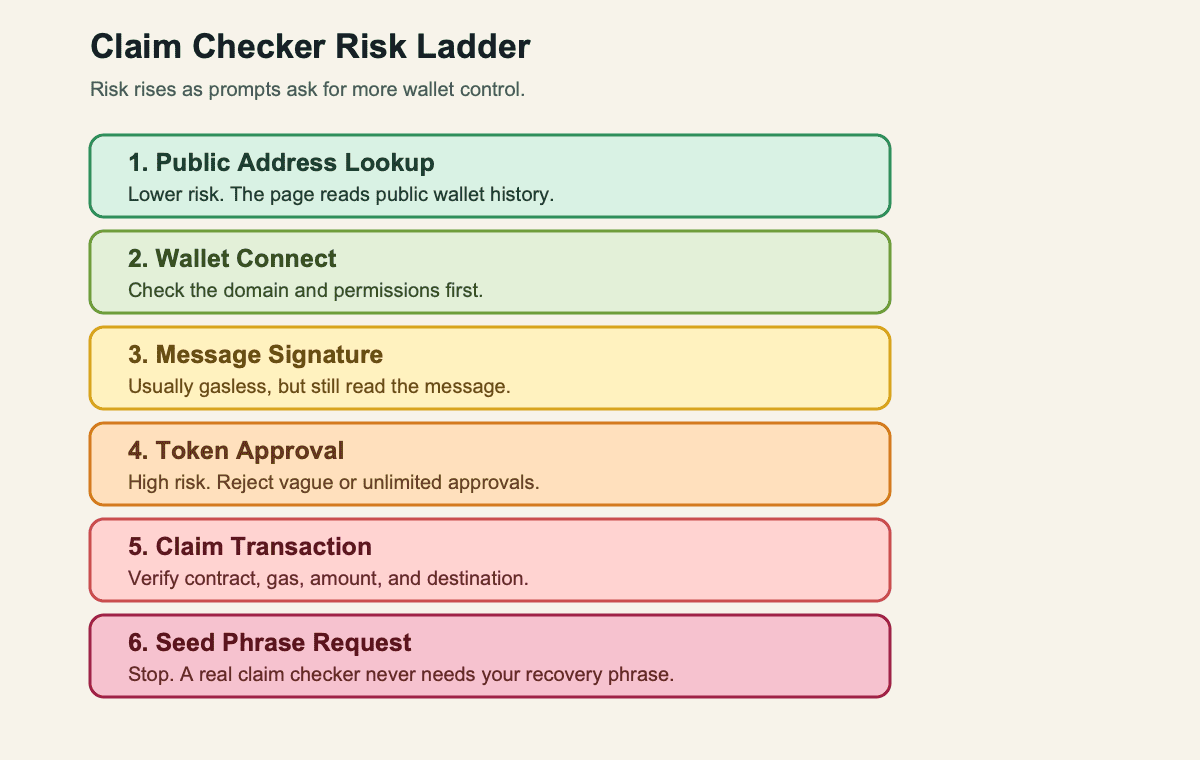
Use this risk ladder before you continue:
| Action | What To Check Before You Continue |
|---|---|
| Public address lookup | Confirm the page does not ask for wallet control. |
| Wallet connect | Verify the domain, app name, and requested permissions. |
| Message signature | Read the message and reject vague ownership text. |
| Token approval | Avoid unlimited spend and unknown contracts. |
| Claim transaction | Check gas, destination, contract, and token amount. |
| Seed phrase | Stop immediately. A real claim checker never needs it. |
For basic wallet safety, separate checking from claiming. A fake page that drains funds after a bad prompt is closer to a hard rug than to a harmless lookup mistake.
Use a claim checker defensively. Start from official project channels, a known wallet dashboard, or a trusted portfolio feature before touching any claim link.
Scam risk is not theoretical background noise. Chainalysis estimated that crypto scams received at least $14 billion on-chain in 2025, and claim pages are a natural place for impersonators to hunt.
Run this quick checklist before connecting a wallet:
Keep records because spam tokens and tiny dust can make a wallet look busier than it really is. Seeing an asset does not mean you should click its website. Sometimes the “reward” is bait with better branding than manners.
A claim checker checks whether your wallet or account matches the rules for a campaign. Those rules can be simple, like holding an NFT before a snapshot, or messy, like earning points across several apps before a cutoff.
Project teams may use snapshots, allowlists, points balances, liquidity use, bridge activity, NFT ownership, region rules, and Sybil screening. If you used the app with one wallet and check another, the result can be wrong for perfectly boring reasons.
Treehouse Protocol’s airdrop guide is a useful real-world example because it separates wallet connection, gasless message signing, allocation details, and vesting labels. That kind of detail helps users see why a checker is more than a yes-or-no box.
Imagine a generic campaign with these rules: wallet activity before a May 29 snapshot, at least three eligible actions, no obvious Sybil pattern, and a vesting label for larger allocations. A wallet can pass one rule and fail another.
So farm activity is only part of the story. A wallet can work hard, miss the snapshot, forget an account link, or trip an anti-abuse filter. The checker reflects the rules, not your emotional investment in the campaign.
A claim checker says you are not eligible when your wallet does not match the campaign data it can see. That answer may be correct, incomplete, stale, or tied to a rule the project never explained well.
This is where airdrop frustration gets loud. People follow testnets, bridge funds, mint badges, collect points, and still see nothing. Rumors on CT can make that feel like a broken promise, but a rumor is not a claim rule.
Check the practical causes before assuming the checker is broken:
If the project has an official appeal process, use that. If it does not, avoid paying anyone who promises to “fix” eligibility. That is usually where disappointment meets a second scam.
If a claim checker says you can claim, verify the claim path before you sign anything. Eligibility is not the same as safety, liquidity, transferability, or value.
First, find the official claim page from the project site, verified social profile, or trusted wallet-native flow. Then compare the domain, token contract, chain, claim window, gas cost, and prompt text. Slow is fine. Losing a wallet quickly is not a productivity badge.
Before you click claim, check these points:
Claiming and holding are separate choices. A free token can still dump hard, trade thinly, or leave late holders in the bagholder crowd after the initial hype fades. Free does not mean frictionless.
A claim checker can get eligibility wrong when its data is stale, incomplete, unofficial, or built around assumptions that changed. A clean interface can still hide old campaign lists and broken claim links.
Third-party checkers may miss chains, ignore off-chain rules, show expired claims, or promote campaigns that never made an official announcement. Some pages also blur the line between “possible future airdrop” and “confirmed claim,” which is a dangerous little fog machine.
> No claim checker can guarantee a future airdrop before official criteria, snapshots, and claim windows are announced. Rumored token pages deserve extra suspicion.
There is also a softer failure mode. Teams can keep eligibility vague, delay claims, change communication, or create bonus tiers that feel movable after users have already spent time and fees. That is not always a soft rug, but the user experience can rhyme.
When two checkers disagree, compare their methods. One may read public addresses, another may use project data, and another may scrape campaign lists. The result is only as good as the source, coverage, and update cycle behind it.
Claim checker examples show why the term is wider than airdrops. The same basic idea appears anywhere a wallet or account may have a reward, mint, payout, or allocation waiting.
Use the examples below as categories, not endorsements of any specific page:
| Example | What The Claim Checker Is Really Checking |
|---|---|
| Project airdrop page | Whether a wallet appears in the official allocation list. |
| Wallet NFT mint suggestion | Whether your address qualifies for a mint or allowlist. |
| Multi-chain claimables dashboard | Whether several wallets have rewards across chains. |
| Creator-fee claim tool | Whether an account has accrued fee revenue. |
| Points campaign checker | Whether campaign activity maps to a reward tier. |
The common thread is eligibility. The checker asks, “Does this wallet or account qualify?” Your next question should be, “What action does the page want from me?”
That second question catches most of the danger. A read-only dashboard, an official claim page, and a random reply-thread link can all use similar words. Only one deserves your wallet.
Related terms help because claim checking sits at the intersection of rewards, wallet safety, scams, and post-claim trading. Knowing the vocabulary makes the result easier to interpret.
Airdrop hunters should know airdrop farming because many claim checker results trace back to months of repeated campaign actions. Farm activity narrows that idea to specific reward tasks, liquidity use, or points strategies. Dust explains why tiny unsolicited tokens and NFTs should not become automatic clicks.
Hard rug and soft rug describe two different failure shapes. A hard rug is immediate value extraction, while a soft rug is slower damage through delays, vague promises, or poor execution. Exit liquidity and bagholder explain the trading side after a token becomes claimable.
The trenches are the noisy place where many of these terms collide. Airdrop hunters track campaigns, rumors, wallets, Discord updates, and claim windows at speed. That can be useful, but speed is exactly why claim links need friction.
Start with the lowest-risk version of a claim checker workflow. Use a public address lookup or wallet-native discovery first, then move to official project pages only when the source is clear.
Do not let the word “claimable” rush the process. A checker result should start a verification routine, not a reflexive wallet connection.
Keep the sequence boring on purpose. Boring keeps wallets alive:
After that, compare the reward with the cost of touching it. Gas, lockups, thin liquidity, and weird approvals can turn a small reward into a bad errand.
If the reward is tiny, stale, locked, or wrapped in weird permissions, skipping it can be the best trade. The cleanest claim checker result is sometimes the one that convinces you not to click.
No. A claim checker is broader than an airdrop checker because it can cover token drops, NFT mints, fee rewards, creator payouts, vesting allocations, and points-based rewards. An airdrop checker is usually focused on token eligibility. The two overlap, but “claimable” can mean more than a free token.
Pasting a public wallet address into a claim checker is usually lower risk because the address is already visible on-chain. It cannot move funds by itself. The risk starts when the page asks you to connect a wallet, sign a message, approve token spending, or follow a claim link.
A claim checker cannot steal crypto from a public address lookup alone. A fake claim checker can drain funds if it tricks you into a malicious signature, token approval, claim transaction, or seed phrase request. If a page asks for your seed phrase, close it.
A claim checker may say you are not eligible because you used the wrong wallet, missed the snapshot, failed a minimum threshold, forgot an account link, hit a region rule, or were removed by Sybil screening. It can also be stale, especially if it is not the official project checker.
No. Claim checker results can be outdated when a campaign closes, a project changes links, or a third-party dashboard stops updating. Use “claimable” as a prompt to verify the official source, claim window, and token contract again. Old results can still point to expired or risky pages.
Use a low-value or burner wallet when a claim checker sends you to an unfamiliar dapp, especially if the claim is small or the project is new. Keep your main holdings away from unknown prompts. A burner wallet does not make bad approvals safe, but it limits the blast radius.